AI Coding Assistants in Legacy Codebases: What Works
AI coding assistants in legacy codebases are useful for reading and risky for rewriting. They summarize, trace and draft tests well, and they guess when behavior lives outside the files they can see. The safety net you build before the first edit matters more than which model you pick.
Key takeaways- Use an assistant to understand legacy code first and to edit it second; every summary is a hypothesis until you check it against the running system.- Write characterization tests before any change, and review each assertion, because a thin legacy suite can stay green while behavior breaks.- Keep auth, session and GDPR deletion paths under line-by-line human review, or leave them manual.- Ask for one small diff at a time and release gradually, so a wrong guess costs minutes instead of an incident.- Do not trust your own sense of speed: a randomized trial found developers felt faster while measuring slower.
The direct answer: useful for reading, risky for rewriting
Assistants are strongest at three jobs: summarizing code, tracing call paths and drafting tests. They are weakest at changing behavior nobody has documented. That split is the whole strategy.
A practitioner write-up from Parka Software on undocumented legacy codebases draws the same line. AI shortens the reading phase of a takeover, it says, but does not replace reconnaissance. Verification still takes as long as before.
The value comes from the net you build first: tests, context notes, small diffs and gradual releases. A better model with no net still guesses. A modest model inside a good net is merely slow to be wrong.
My judgment call is simple. Use the assistant to understand code before you let it edit anything. If you skip that order, you inherit its confidence without its knowledge.
Why legacy code breaks the assumptions assistants rely on
A model predicts plausible code from the context it can see. Legacy behavior often lives somewhere else: in data, in config, in deployment scripts and in people's heads.
The visible slice is not the system
Context windows rarely hold a whole monolith. The assistant sees fragments and fills the gaps with fluent guesses. The Parka write-up gives a clean example: an assistant reads sp_UpdateUser and explains it accurately, but cannot know that production calls sp_UpdateUser2, or that a trigger rewrites the row afterward.
Noise looks like signal
Dead code, duplicated logic and misleading names all read as evidence to a model. A function called validateOrder that no longer validates anything will still be summarized as validation. Intent is the worst gap. In the same write-up, an assistant calls a nightly reprocessing job redundant, while the job exists because a partner sends corrected files late. The reason was never in the code.
These errors read as fluently as correct output. That is why they are dangerous.
Practical rule: Treat every assistant summary of legacy code as a hypothesis, and check it against the call graph, the database and production configuration.
Where assistants earn their place
Summarizing modules and tracing requests
Ask for a paragraph on a large unfamiliar module, plus the tables it reads and writes. Ask it to trace a request from the HTTP handler through the layers to the query. Then verify against the real call graph with your IDE or a search tool.
This is where the time savings are real, because reading is the slow part of legacy work. Parka lists summarizing, call-path tracing, solution mapping and finding every usage of a column or config key among the things the tools do well.
Characterization tests
A characterization test pins what the code does today, including the odd behavior. You are not asserting correctness. You are building a tripwire for the refactor.
Assistants draft these quickly from sample inputs. The catch is that the generated assertions can enshrine bugs. Review each one and ask whether the behavior is intended, accidental or unknown. Mark the unknown ones rather than deleting them.
Mechanical translation
Old framework idioms, deprecated API migrations and repetitive renames suit an assistant, provided a compiler and a test gate sit behind it. A compiler catches an invented method in code. Nothing catches it in a written summary, which is why translation of code is safer than translation of explanation.
Missing docs and runbooks
Let it draft the architecture note, the module README and the runbook skeleton. Then correct them by hand. The draft saves typing; the corrections are where the knowledge goes in. I cover the review habits in how I review AI generated code.
Where they fail, and when not to use them
Implicit contracts
Legacy systems run on rules nobody wrote down. Typical ones include:
- Side effects that callers depend on.
- Ordering assumptions between jobs or handlers.
- Timezone and encoding quirks in stored data.
- Database triggers the application code never mentions.
Parka also notes that an assistant can state a discount applies when a field equals 3, but what 3 means is a question for a person. If a change touches one of these contracts, the assistant has no way to see the risk.
Security- and identity-sensitive paths
Keep auth flows, session handling and GDPR deletion logic manual, or review them line by line. These paths fail quietly: a deletion routine that skips one table looks fine in a demo.
The evidence on generated code security is a clue, not a verdict. Veracode's 2026 GenAI Code Security Report, as summarized by VibeDoctor, reports a 56% average security pass rate across more than 100 models, with syntax correctness near 100%. The prompts carried no security instructions. That shows compiling code and safe code are different skills. It does not show how your assistant performs on your auth module with a good prompt.
The honest limitation
A green test suite proves little if the suite is thin, and legacy suites usually are. Passing tests mean the assistant did not break what the tests cover. They say nothing about the rest.
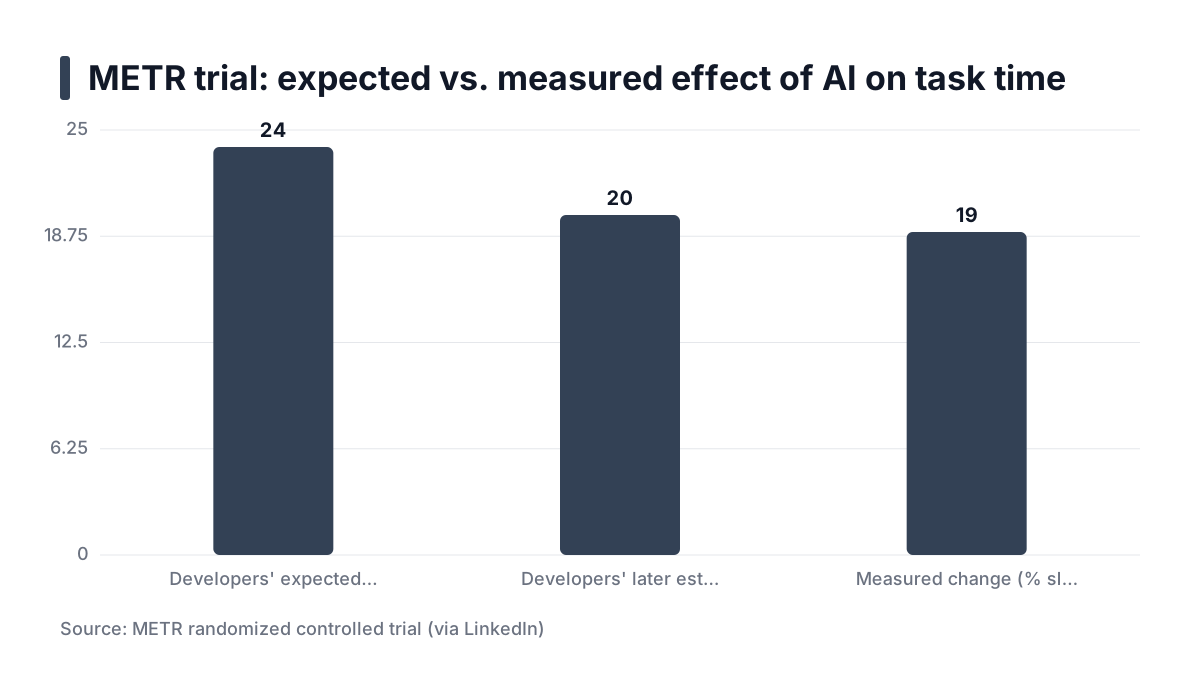
Do not trust your sense of speed either. A METR randomized trial, posted on LinkedIn, had 16 experienced open-source developers complete 246 real tasks in large repositories. Developers expected a 24% speedup and later estimated 20%, yet measured 19% slower with AI allowed. METR states it is not claiming this holds for all software engineering. Read it as a warning that self-reports mislead, not as proof that assistants slow everyone down. An independent re-analysis of the data found the result appeared robust to different slicing, though it also noted the small developer sample.
Contrast that with the early Copilot experiment, where developers wrote an HTTP server in JavaScript 55.8% faster. That was a greenfield task with a clear spec. Legacy work has neither.
Practical rule: Do not let an assistant edit code whose behavior you cannot test, and never let it edit identity or deletion paths unreviewed.
A worked example: extracting a function from a tangled module
This is an illustrative example, not a recorded project. The numbers are made up to show the shape of the work.
Take a 300-line function, process_order, with no tests and a dozen nested branches.
Step 1: Explain, then confirm
Ask the assistant to list the branches and what each reads and writes. Then read the function yourself and run it with a few inputs. Note every claim you could not confirm. Those become questions for a colleague or a log search.
Step 2: Pin behavior
Collect real inputs from logs or a staging copy, with personal data removed. Run the function, capture the outputs and have the assistant draft tests around them. Review every assertion. If one encodes a rounding bug or a swapped field, flag it and decide deliberately whether to preserve it.
Step 3: One extraction per diff
Request a single extraction, for example the tax calculation block into calculate_tax. Run the tests, the linter and static analysis. Then compare behavior in a staging or shadow run before merging.
The trade-off
This is slower than letting the assistant rewrite the whole function in one pass. In exchange, every step can be reverted and explained in review. If a reviewer asks why a line changed, you have an answer. For a similar discipline on a larger scale, see my notes on rebuilding a 10-year-old open source package with Cursor and Claude.
Set the guardrails: context, review and release
Give it context, not the repository
Write a short architecture note: modules, conventions and known traps. Add a do-not-touch list. Parka also recommends supplying schema, configuration and scheduled jobs alongside the code, since those are exactly what the assistant cannot see.
A short, curated note beats a pasted repository. It keeps the assistant on the part that matters and gives you something to update when it errs. Good module boundaries help here too; see structuring a codebase for scale and maintainability.
Check your data rules first. Confirm what your organization permits before production data or client code goes to a hosted model.
Review it like a junior's pull request
Apply the same bar you apply to people: CI, tests, dependency scanning and image scanning. On the platforms I run, every container image is scanned with Trivy in CI, and AI-written changes get no exemption.
Match the depth of review to the blast radius. One practitioner framework, posted on LinkedIn, scales gates from a light check for a broken dashboard chart to a heavy security review for payment or PII paths. The specific thresholds there are one author's opinion, but the principle holds: review by consequence, not equally.
Trust is conditional among developers generally. The 2026 Stack Overflow survey, as reported by ZoVintra, found 48.0% trust AI output only when they can easily verify it. Legacy code is where easy verification is hardest, so expect to trust less there.
Release so a wrong guess is cheap
Use feature flags or gradual rollouts, so a wrong guess costs minutes. This is the same habit as zero-downtime releases: small changes, fast rollback, metrics watched during the rollout. Rollback of an assistant's change should be a flag flip or a single revert, not a data repair.
Practical rule: Size your review and your rollout to the blast radius, and make every assistant change revertible without touching data.
Run this routine on every legacy change
- Define the one behavior you want to change and the area you will not touch.
- Write a short context note covering modules, conventions and known traps.
- Ask for an explanation first, and verify its claims against code, config and logs.
- Generate characterization tests and review each assertion before editing anything.
- Request one small diff at a time, and run tests, linters and security scans on each.
- Review for hidden contract changes, then release gradually and watch metrics.
- Record what the assistant got wrong and add it to the context note.