GDPR Data Erasure Implementation: A Step-by-Step Build Guide
A user clicks "Delete account," the row disappears from the users table, and weeks later their name still shows up in search results and in last quarter's export. That is the usual result of a GDPR data erasure implementation built as one DELETE statement. A correct one is a single audited transaction that removes or anonymizes data in foreign-key order, followed by asynchronous cleanup of every copy outside the primary database.
Key takeaways >- Build one erasure function that runs in one database transaction, deletes leaf tables first and anonymizes records you must keep. Every trigger, user or staff, calls it.- Article 17 is not absolute. Decide per data class, with legal, what is deleted, what is anonymized and what is retained, and write the reason down.- Treat search indexes, caches, exports and processors as separate deletion targets driven by an outbox written inside the erasure transaction. Count a missing document as success.- Use self-service requests with a grace period and a staff review panel gated by a dedicated role. Reviewers see request metadata, never the exported personal data.- Backups keep the data until they expire. Document the window and re-apply erasures after any restore.
What a GDPR data erasure implementation actually requires
The direct answer is one audited, transactional erasure path. It deletes or anonymizes in FK-safe order inside the primary database, then hands every copy elsewhere to an asynchronous cleanup process. Anything less leaves orphaned rows, stale search documents or an unrecorded decision.
Article 17 is not absolute
The right to erasure has exceptions. The text of Article 17 as reproduced by Datadiem Avocat says paragraphs 1 and 2 do not apply to the extent processing is necessary for compliance with a legal obligation under Union or Member State law. They also do not apply where it is necessary for the establishment, exercise or defence of legal claims.
For an engineer, that sentence is the design brief. Accounting and tax rules usually require you to keep order and invoice records for a statutory period, so the system cannot simply delete everything. The pattern is to delete what you can and anonymize what you must keep.
The exact retention periods depend on your jurisdiction and business. I will not state any here, and you should not guess them. Get them from legal, in writing.
Why self-service plus staff review
There are three common ways to run erasure. Each has a different failure mode.
- Ticket queue: Support receives an email, files a ticket and an engineer acts on it. It is slow, hard to audit and easy to forget.
- Engineer with SQL: Fast for one request, but it depends on one person remembering the table order. It also leaves no structured record of who decided what.
- Self-service plus staff review: The user starts the request, the system checks for blockers and a reviewer approves or rejects it. Every state change is a row with an actor and a timestamp.
I prefer the third. It turns a legal obligation into a state machine you can test, monitor and show to an auditor.
The gaps this guide fills
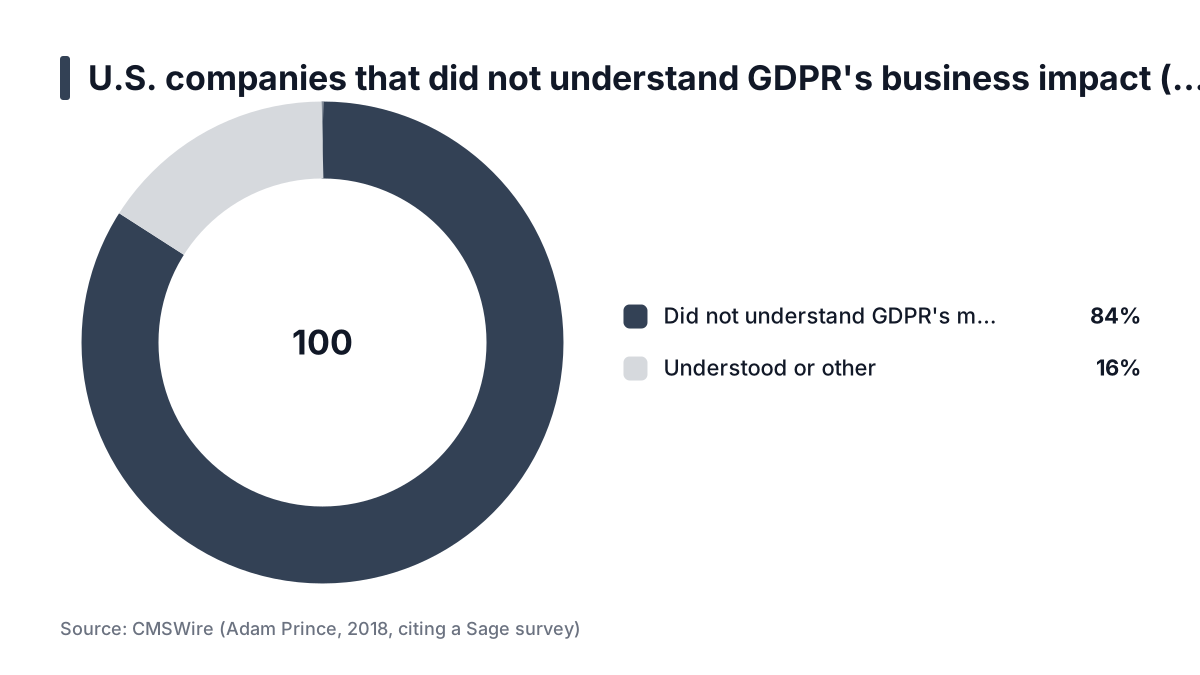
Legal texts and explainers cover the right itself well. A 2018 CMSWire article by Adam Prince, citing a survey by his own company Sage, reported that 84 percent of U.S. companies did not understand what the GDPR meant for their business. That is a vendor survey taken just before the regulation applied, so it is a clue about awareness at the time, not proof of how teams build erasure today.
What those explainers say little about is engineering. The gaps are ordering, search indexes, exports, backups and verification. The rest of this guide covers them.
Prerequisites
Do not start coding until these four exist. Each missing one produces a specific failure later.
A data inventory
List every table, search index, cache, object bucket and third-party processor that holds personal data. Give each entry an owner and a retention reason. Without the inventory, the erasure function covers only the tables someone remembers.
Treat the inventory as a living file in the repository, not a spreadsheet nobody opens. It should change in the same pull request that adds a column. Later, a CI test will enforce that.
A written retention decision per data class
For each data class, agree with legal what is deleted, what is anonymized, what is kept and for how long. A decision like "keep orders for the statutory period, strip identity fields" is enough. A vague "we keep what we need" is not.
An identity provider with roles
The staff review panel needs an identity provider with roles. I use Keycloak, and I manage it as code with Terraform, so the reviewer role is reviewable in a pull request instead of clicked into a console. The platform I run serves 400K+ users on Kubernetes with Keycloak, and that is the setup this design comes from. You can read more on the about the author page.
If you use another provider, the requirement is the same. You need a dedicated role, server-side enforcement and an audit trail of who held it.
Infrastructure pieces
You need four components:
- A background worker, so heavy jobs stay out of the web request path.
- Object storage that supports presigned URLs.
- A transactional database.
- An outbox table or an equivalent mechanism.
If your database is not transactional across the tables involved, for example because personal data is split over several stores, the single-transaction design needs adapting. In that case, lean harder on the outbox and on idempotent steps.
Practical rule: If a data location is not in the inventory with an owner and a retention reason, the erasure function will not cover it.
Step 1: Map personal data and decide delete versus anonymize
Classify every column as delete, anonymize or retain. Record the legal basis for any retention next to the decision. The table below shows a typical classification for a marketplace-style product.
Data class | Typical action | Reason | Watch out for |
|---|---|---|---|
Messages, saved searches, sessions | Delete | No retention reason | Counterparty's copy of a conversation; decide whether it is theirs |
Listings and uploaded media | Delete | User content, no statutory need | Object storage copies and CDN caches |
Orders and invoices | Anonymize | Statutory retention | Free-text fields such as notes and delivery instructions |
Tax lines, amounts, dates | Retain | Statutory retention | Joining them back to identity through logs |
Email, phone, address | Delete or strip | Identity fields | Copies in analytics events and email provider lists |
Audit log of the erasure | Retain (minimal) | Proof of compliance | Do not store the erased values in it |
Anonymize irreversibly
Strip name, email, phone and address from retained orders. Keep amounts, tax lines and dates. Replace identifiers with random tokens, not with a hash of the email.
A hash of a low-entropy value such as an email address can be reversed by hashing candidates until one matches. The hoop.dev guide on anonymization and minimization distinguishes pseudonymization, which replaces identifiers with placeholders, from true anonymization, where re-identification is practically impossible. Its tokenization technique uses unrelated strings. That is a general best-practice article, so it supports the distinction but not any specific threshold for your data.
If you need to join anonymized rows for reporting, use a random token generated once per erased user. Do not derive it from anything about them.
The judgment call
If a table has no retention reason, delete it. Do not anonymize it. Anonymized rows are still a liability if they can be re-identified, for example through a rare combination of postcode, timestamp and amount. Deletion has no such risk.
Free-text columns are the usual trap. An order note reading "leave with neighbour at number 12" is personal data. Either null the column or classify it explicitly. Never assume it is clean.
Step 2: Build the self-service export and deletion request flow
Authenticated users request an export or a deletion from account settings. Before accepting a deletion request, ask for recent re-authentication. A session left open on a shared machine should not be enough to destroy an account.
Model requests as rows
Store each request as a row with state, timestamps and actor. A workable state set is:
requestedgrace_periodpending_reviewapprovedexecutingcompletedrejectedcancelled
Every transition writes who did it and when. That history is your evidence if a user or a regulator asks what happened.
For comparison, the Piler Enterprise erasure documentation models a similar lifecycle with statuses such as pending, assessing, blocked, pending_approval and approved. It also provides an audit trail and a downloadable deletion certificate. Its context is email archiving, but the shape transfers.
Add a grace period
Hold approved deletions for a few days and send a cancel link. This prevents account-takeover deletions, where an attacker who gains access destroys evidence along with the account. It also catches accidental clicks.
The trade-off is that the user's data lives a few days longer. Keep the grace period short and tell the user exactly when deletion will occur.
Track the response clock
Article 12(3) sets a one-month window for responding to a request, with extensions available in some cases. Confirm the exact wording and your own obligations with legal. The point for the build is that your states should track the clock.
Example, with illustrative dates: a request arrives on 3 March. A five-day grace period ends on 8 March. If your internal target is to finish ten days before the one-month mark, the dashboard turns amber on 24 March. That leaves a week of headroom for a stuck worker.
A request waiting in pending_review is the state most likely to breach the clock. Alert on its age, not just on failures.
Step 3: Add a staff review panel gated by a Keycloak role
A review step catches requests that should not proceed: an account under a fraud hold, an open dispute, or a legal hold. The Espresso data deletion module describes the same idea. It checks deletion holds and objections before every deletion and requires a person's approval where necessary. Piler's workflow similarly blocks requests when an affected record is under legal hold. Those are vendor docs, so treat them as design patterns, not as evidence of legal necessity.
Create a dedicated role as code
Create a realm role such as privacy-reviewer and assign it through Terraform, not the console. This is an example using the community Keycloak provider. Resource names and arguments vary by provider version, so check its documentation.
resource "keycloak_role" "privacy_reviewer" {
  realm_id    = "example-realm"
  name        = "privacy-reviewer"
  description = "Can approve or reject data-rights requests"
}
Managing it as code gives you a pull request for every grant. Rolling back is a revert and an apply. A console click leaves no such trail.
What the panel shows
The panel should show request state, account flags and blockers. It should not show personal data. A reviewer needs to know whether the request is safe to execute, not what the user's messages said.
- Request state, age and deadline.
- Account flags: open dispute, fraud hold, legal hold, active payout.
- The blocker reason, if any, and who set it.
Enforce the role on the server
Check the role in the API handler for every action, not only by hiding buttons in the UI. A hidden button is not access control.
def approve_request(request_id, token):
    require_role(token, "privacy-reviewer")   # server-side, every call
    req = load_request(request_id)
    assert req.state == "pending_review"
    record_transition(req, "approved", actor=token.subject)
Log the reviewer's identity on every approve and reject. To test it, call each endpoint with a token that lacks the role and expect a 403. Put that test in CI, so a new endpoint cannot ship without a check.
Practical rule: Delete requests are state machines with an actor on every transition, and reviewers decide on metadata, never on the user's data.
Step 4: Generate exports in a worker on object storage with presigned URLs
The export flow is the other half of the data-rights system, and its risk is that the export becomes a new copy of personal data. Design it so the copy is short-lived.
The flow
The worker assembles a JSON and CSV archive per user. It writes the archive to a private bucket and emails a presigned URL. Never build exports in the web request path. Large accounts time out and tie up pods that should be serving traffic.
On Kubernetes, a worker deployment or job with its own resource limits keeps a heavy export from competing with page loads. That also makes it easy to scale the worker separately.
Keep the copy short-lived
Keep URL lifetimes short, in hours rather than days. The exact maximum depends on your provider and credential type, so check its documentation. Add a bucket lifecycle rule that deletes the object after 7 days, so the export does not turn into a permanent store. This is an example in S3-style syntax. Other providers differ:
{
  "Rules": [{
    "ID": "expire-exports",
    "Status": "Enabled",
    "Filter": { "Prefix": "exports/" },
    "Expiration": { "Days": 7 }
  }]
}
Lifecycle rules usually run on a schedule, so an object can outlive its nominal expiry by some hours. Check how your provider handles this before promising users an exact deletion time.
Lock down access
- Encrypt the bucket at rest.
- Scope the worker credentials to the
exports/prefix only, with no list or read rights elsewhere. - Log object creation and deletion, so you can show an export existed for seven days and no longer.
To test, request an export for a seeded account and confirm that the URL works. Then confirm that it fails after expiry and that the object is gone after the lifecycle window. Rolling back is simple: disable the feature flag and delete the prefix.
Step 5: Implement one transactional erasure path in FK-safe order
Route every erasure trigger through a single function. That includes user-initiated, staff-initiated and any automated retention job. Two paths drift apart, and the one used less often is the one that breaks.
The order
Run the function in one database transaction. Delete leaf tables first: messages, saved searches, sessions and listings. Then anonymize orders. Delete the user row last. Deleting in the reverse order fails on foreign keys or, worse, succeeds by cascading into rows you meant to keep.
This is an example sketch in PostgreSQL. Table and column names are illustrative:
BEGIN;

SELECT id FROM users WHERE id = :uid FOR UPDATE;

-- outbox events first, while the rows still exist
INSERT INTO outbox (topic, payload)
SELECT 'search.delete', jsonb_build_object('doc_id', id)
FROM listings WHERE user_id = :uid;

DELETE FROM messages       WHERE sender_id = :uid;
DELETE FROM saved_searches WHERE user_id   = :uid;
DELETE FROM sessions       WHERE user_id   = :uid;
DELETE FROM listings       WHERE user_id   = :uid;

UPDATE orders SET
  buyer_name    = 'erased-' || gen_random_uuid()::text,
  buyer_email   = 'erased-' || gen_random_uuid()::text || '@example.com',
  buyer_phone   = NULL,
  billing_addr  = NULL,
  notes         = NULL,
  user_id       = NULL
WHERE user_id = :uid;

DELETE FROM users WHERE id = :uid;

INSERT INTO erasure_log (user_ref, completed_at) VALUES (:uid, now());

COMMIT;
The FOR UPDATE lock stops a concurrent login or listing creation from adding rows mid-erasure. The outbox rows are written inside the same transaction. If anything fails, the rollback removes the events too, so no side effect exists without a matching change.
Messages need a judgment call. Deleting only messages the user sent leaves the other party's own messages intact. Decide that with legal rather than letting the query decide it by accident.
Test the order in CI
Derive the order from the foreign-key graph, not from memory. In CI, seed a database with one fully populated user and run the function. Then assert two things:
- No row anywhere references the user, except the explicitly retained and anonymized ones.
- Every table with a foreign key to
usersappears in your classification file.
The second check is the one that catches the new table nobody added to the inventory. It fails the build until someone makes a retention decision.
Example: a seeded user has 240 messages, 12 listings and 3 orders. After the run, the test expects 0 messages, 0 listings, 3 orders with null identity fields, 12 outbox events and 1 log row. Any other count fails the build.
Changes like this stay contained when the erasure logic lives in one module with a narrow interface, which is the argument in structuring a codebase so changes like this stay contained. If an AI assistant drafts any of the SQL, apply the discipline in reviewing generated code before it touches deletion logic. A wrong WHERE clause here is irreversible.
Rolling back a bad release of the function means reverting the code. Rolling back a bad execution is impossible once it commits, which is why the grace period and review step exist.
Step 6: Propagate deletes to search and other copies with an outbox
The primary database is only one copy. The outbox pattern gives you a reliable way to reach the others.
Outbox to search
In the erasure transaction, insert one delete event per affected document into an outbox table. A relay process reads unpublished rows and calls the search index. It marks each row as published only after the index confirms.
Make deletes idempotent and retry them with backoff. A missing document must count as success, because a retry after a partial failure will otherwise fail forever on something already gone.
Do not confuse this with the search-engine delisting discussed in DIGITALEUROPE's response to draft EDPB guidelines. That concerns public web search providers. Your internal index is your own responsibility.
Allow for index timing. Piler's documentation lists search index timing among its limitations, and the same applies to you. A deleted document may remain visible for a short refresh interval. Check your engine's documentation for how deletes become visible.
Cover every other copy the same way
Apply the same pattern to each location in your inventory:
- Caches: Emit an invalidation event keyed by user ID.
- Analytics: Delete or anonymize events by user identifier, and check whether your warehouse supports row-level deletion.
- Email providers: Call the provider's deletion or suppression API.
- Object storage: Delete the user's media and any leftover exports.
Record each processor's confirmation. The Espresso module's principle is a good one: if a response is missing, raise an alert, and only what has been confirmed counts as deleted. The Solaris documentation on deletion requests shows the inbound version of the pattern. Integrators subscribe to a PERSON_DELETED webhook and must delete the named person's data immediately. Your own processors deserve the same kind of explicit signal.
Mark each outbox topic with a deadline. Alert if an event stays unconfirmed beyond it.
The honest limitation
Backups still hold the data until they expire. Piler's documentation also flags backup considerations as a limitation of its approach. You cannot practically edit an immutable backup, so document the retention window and tell users about it.
Then protect against resurrection. Keep a minimal erasure ledger containing only internal identifiers and timestamps. After any restore, replay the ledger before the system goes back into service. Without that step, a restore silently un-erases users.
Practical rule: An erasure is complete when the transaction has committed and every outbox event is confirmed, not when the user row is gone.
Set this week's erasure plan
- Build the inventory. List every table, index, cache, bucket and processor that holds personal data. Give each an owner and a retention reason, and commit the file to the repository.
- Get the retention decisions in writing. Sit down with legal and classify each data class as delete, anonymize or retain. Record the legal basis for every retained class.
- Write the erasure function and its CI test. Implement the single transactional path in FK-safe order, with outbox rows inside it. Add a test that fails when a table referencing users is missing from the classification.
- Create the reviewer role as code. Add
privacy-reviewerto your Terraform, enforce it in every API handler, and test that a token without it gets a 403. - Move exports into a worker. Write to a private bucket, set short URL lifetimes, add the 7-day lifecycle rule and verify that the object disappears.
- Wire the outbox to search and processors. Make deletes idempotent, add retries with backoff and alert on any event unconfirmed past its deadline.
- Document the backup window. Write down how long backups live, create the minimal erasure ledger and add "replay the ledger" to your restore runbook.