Kubernetes Rolling Update Strategy Explained: maxSurge to Rollback
A rolling update replaces old pods with new ones in batches, limited by maxSurge and maxUnavailable, which both default to 25%. It is the default Deployment strategy and fits most stateless services. It only delivers zero downtime when readiness probes, graceful shutdown and spare capacity are set up correctly.
Key takeaways- A rolling update is bounded by two numbers: how many extra pods may exist (maxSurge) and how many may be missing (maxUnavailable). The 25% defaults are a starting point, not a decision.- Zero downtime depends on a readiness probe that checks real dependencies, apreStopdelay, a sensibleterminationGracePeriodSecondsand enough spare capacity.- For capacity-sensitive services,maxUnavailable: 0withmaxSurge: 1is the safest setting, at the cost of slower rollouts and one temporary extra pod.- Old and new versions serve traffic together, so database and API changes must be backward compatible.- Rolling updates cannot do percentage-based canaries. Use a tool such as Argo Rollouts or Flagger for that.
The direct answer: what a rolling update does and what protects it
A rolling update swaps pods in steps instead of all at once. Codemia's explainer describes it as Kubernetes controlling how many old pods may go down and how many extra new pods may come up during the transition. Recreate is the alternative: it stops the old pods first, then starts the new ones, which usually means downtime.
The defaults matter. The maxSurge and maxUnavailable fields each default to 25% of the desired pod count, as a Tencent Cloud community write-up of the Deployment spec notes. That is fine for a demo. It is a guess for a production service.
Zero downtime is not a property of the strategy. It is a property of the whole setup:
- Readiness probes decide when a new pod may receive traffic.
- Graceful shutdown decides whether in-flight requests survive an old pod's exit.
- Spare capacity decides whether the remaining pods can carry the load mid-rollout.
If one of these is missing, the rollout still "succeeds" while users see errors. I treat the strategy as the mechanism and those three as the guarantee.
How the Deployment controller actually performs the rollout
A new ReplicaSet per template change
A rollout starts when the pod template changes. Codemia lists the common triggers: a new image, changed environment variables, updated labels or annotations in the template, or modified resource requests and limits. Scaling a Deployment does not trigger one, as the Tencent article quotes from the Kubernetes docs.
The controller creates a new ReplicaSet and scales it up while scaling the old one down. You can watch the handoff with kubectl get rs, which Codemia calls useful because it makes the old-to-new transition visible.
Rounding rules
Percentages are converted to whole pods, and the direction of rounding is not symmetric. The Tencent article states that maxSurge rounds up and maxUnavailable rounds down. Two invariants follow:
- Available pods should not drop below desired minus
maxUnavailable. - Total pods should not exceed desired plus
maxSurge.
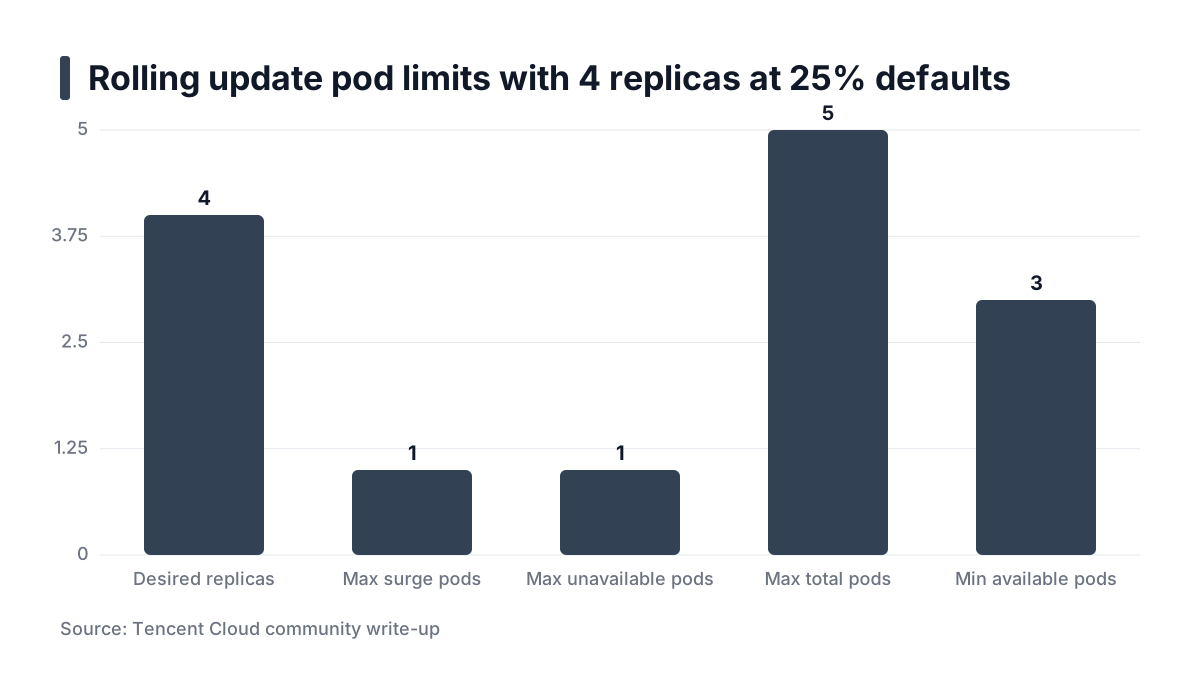
Example: with 4 replicas and the 25% defaults, the surge is 1 pod and the unavailable allowance is 1 pod. So the rollout can run up to 5 pods and must keep at least 3 available. With 3 replicas, 25% of 3 is 0.75. Surge rounds up to 1, unavailable rounds down to 0. Small deployments quietly become cautious.
Both values cannot be zero at once. The same source notes that maxSurge cannot be 0 if maxUnavailable is 0, and vice versa, because the rollout could not make progress.
What "available" means
A new pod counts as available only after its readiness probe passes and minReadySeconds has elapsed. The Tencent article defines minReadySeconds as how long a new pod must stay Ready before it is considered Available. That delay is cheap insurance against a pod that passes readiness once and then crashes.
Watching and rolling back
Use kubectl rollout status deployment/web to see whether the update has completed. Use kubectl rollout history deployment/web to list revisions. kubectl rollout undo deployment/web returns to the previous revision, per Codemia. Undo only works if old ReplicaSets still exist. That is what revisionHistoryLimit controls, so keep it high enough to reach a known-good revision. The default is version-dependent, so check the official Deployment documentation for your cluster.
Practical rule: Know your rounding. Compute surge and unavailable pods for your replica count before you rely on a percentage.
Tuning maxSurge, maxUnavailable, probes and shutdown
Capacity-sensitive services
For services that cannot lose capacity, I set maxUnavailable: 0 and maxSurge: 1. Old pods are removed only after a new one is Ready. The cost is a slower rollout and one temporary extra pod, which means the cluster needs headroom for it.
One of the sources recommends a similar zero-downtime setting, maxUnavailable: 0, and suggests limiting maxSurge to 1 to avoid an image-pull storm saturating node bandwidth, per a Chinese-language production guide. That guide is a single blog post, so treat it as a clue and not as proof. The reasoning is still sound: surging many pods at once multiplies pulls and startup load.
When not to do this: if the cluster has no spare capacity, a surge pod stays Pending and the rollout stalls. That is safe, but it will look like a failure in CI.
Readiness that means something
Readiness gates traffic. Pass4Sure's overview describes the readiness probe as the one that controls service routing, separate from liveness and startup probes. A probe that only checks an open port says the process is listening, not that it can serve.
I prefer a readiness endpoint that checks the dependencies a request needs, such as the database connection or a required config load. Keep liveness separate and shallow. If liveness checks the database, a database blip restarts every pod at once.
A forum thread on Discuss Kubernetes shows a common confusion. A user with maxSurge: 100% and a readiness probe on / reported old replicas being terminated immediately. The thread has no answer, so I will not claim a cause. It is a reminder that aggressive surge values and a weak probe path give you little protection.
Shutdown ordering
Endpoint removal and SIGTERM race each other. A pod can receive SIGTERM while load balancers and kube-proxy still route to it. Two settings help:
- A
preStopsleep of a few seconds gives endpoint removal time to propagate before the app begins shutting down. terminationGracePeriodSecondsshould exceed your longest normal request plus thepreStopdelay. Otherwise the kubelet kills the container mid-request.
This is reasoning from how the pieces interact, not a measured figure. Pick the sleep length by testing against your own load balancer.
Fail fast
Set progressDeadlineSeconds so a stuck rollout is marked failed instead of hanging in CI. Pair it with kubectl rollout status deployment/web --timeout=5m, a pattern the cnblogs guide also shows. Note that Kubernetes does not roll back on its own when the deadline passes. It reports the failure, and your pipeline must decide what to do.
Practical rule: Gate traffic on a real readiness check, drain with a preStop delay, and give every rollout a deadline.When rolling updates are the wrong tool
Incompatible versions running together
During a rollout, old and new versions serve traffic simultaneously. A migration that drops a column the old version reads will break the old pods mid-rollout. The same goes for an API change that removes a field.
Use expand-and-contract:
- Expand: add the new column or field while the old code still works.
- Deploy the new code, which uses the new shape.
- Contract: remove the old shape in a later release, once no old pods remain.
Singletons and exclusive volumes
A workload that must run exactly one copy, or that needs exclusive access to a volume, fits Recreate. A surge pod would try to attach the same volume while the old one holds it. Accept the brief downtime, or redesign the workload.
StatefulSets
StatefulSets have their own ordered RollingUpdate, with a partition field to hold back lower ordinals. They do not follow Deployment semantics. Read the StatefulSet documentation for your version before reusing Deployment assumptions.
Percentage canaries
Here is the honest limit. A rolling update shifts traffic by pod count, so you cannot send exactly 5% of requests to the new version. Some blog posts, including the cnblogs guide, show canary configuration with setWeight steps. That syntax belongs to a rollout controller, not to a plain Deployment. For real weighted canaries, use Argo Rollouts or Flagger. Argo Rollouts is a controller with its own resource type, while Flagger automates progressive delivery on top of your existing Deployments, so the choice depends on whether you want to replace the Deployment resource.
Practical rule: If two versions cannot coexist, or you need a percentage of traffic, a plain rolling update is the wrong tool.
Worked example: a 6-replica API shipping a bad build
This is an illustrative example, not a recorded incident. The numbers are chosen to make the mechanics visible.
apiVersion: apps/v1
kind: Deployment
metadata:
  name: api
spec:
  replicas: 6
  minReadySeconds: 10
  progressDeadlineSeconds: 300
  strategy:
    type: RollingUpdate
    rollingUpdate:
      maxSurge: 2
      maxUnavailable: 0
  selector:
    matchLabels:
      app: api
  template:
    metadata:
      labels:
        app: api
    spec:
      terminationGracePeriodSeconds: 45
      containers:
        - name: api
          image: registry.example.com/api:2.4.1
          readinessProbe:
            httpGet:
              path: /healthz/ready
              port: 8080
          lifecycle:
            preStop:
              exec:
                command: ["sleep", "8"]
---
apiVersion: policy/v1
kind: PodDisruptionBudget
metadata:
  name: api
spec:
  minAvailable: 5
  selector:
    matchLabels:
      app: api
The PodDisruptionBudget protects against voluntary disruptions such as node drains during the rollout. It does not govern the rollout itself.
Walking the steps
- You push a build whose readiness endpoint returns an error because it cannot reach its database.
- The controller surges to 8 pods: 6 old, 2 new.
- The 2 new pods never pass readiness, so they are never counted as available.
- With
maxUnavailable: 0, the controller may not remove any old pod. All 6 old pods keep serving. - The rollout stalls. After
progressDeadlineSecondsit is marked as failed.
Users see no outage. The failure shows up in the pipeline, which is where you want it.
Recovering
Run kubectl rollout undo deployment/api. Then inspect with kubectl describe deployment/api for conditions and events, kubectl rollout history deployment/api for revisions, and kubectl logs <pod> --previous for crashed containers, a command the cnblogs guide also lists.
The worse case
Now imagine a build that passes readiness but fails later, say a memory leak or a bug on one code path. Readiness is satisfied, minReadySeconds elapses, and the rollout completes. All 6 pods run the bad version. A stalled rollout is the best case because the system caught the problem for you. The later failure needs monitoring, alerts and a fast undo.
Set this week's publishing plan
Use this checklist before every rollout change. It is not a publishing calendar; it is the order in which I would review a Deployment.
- Confirm readiness and liveness probes are distinct, and that the readiness probe reflects real dependencies.
- Set
maxSurgeandmaxUnavailableexplicitly instead of trusting the 25% defaults, based on spare cluster capacity. - Add a
preStopdelay, a grace period longer than your slowest request, and a PodDisruptionBudget. - Scan the image with Trivy in CI, and confirm the migration is backward compatible with the previous version.
- Deploy, watch
kubectl rollout statuswith a deadline, and rehearsekubectl rollout undoon staging.
For more on this kind of work, see more platform engineering notes, how I run platform and security work and my side projects.