Managed Keycloak Hosting: What You Get and What You Still Own
Managed Keycloak hosting means a provider runs the Keycloak servers, the database, TLS, backups and upgrades, while you keep the identity design: realms, clients, flows and user data decisions. It buys back operations time, not design work. Pay for it if nobody on your team can own a clustered Java service and its database, and verify the provider's upgrade and CVE behavior before you sign.
Key takeaways- Managed hosting moves operations (images, database, clustering, certificates, patching, backups) to the provider. Realm design, client registration, roles, MFA policy and login experience stay with you.- Custom SPIs, extensions and themes are the grey zone. Many providers restrict them, so ask before you build on them.- Keycloak is hard to run mainly because of distributed session caches, schema-changing major upgrades, and hostname and proxy configuration behind load balancers.- Below a dedicated platform team, pay for managed. Above it, running Keycloak yourself on Kubernetes usually pays back in control over upgrade timing and CVE response.- Keep your configuration in Terraform and test an exit before you commit. That is what keeps a managed service from becoming lock-in.
What managed Keycloak hosting is, in one answer
A provider runs Keycloak for you. That covers the container images, the database, TLS certificates, backups and version upgrades. You decide what the identity system actually does.
The work moves rather than disappears. You stop tuning a JVM and start reviewing a provider's upgrade notices. You stop restoring Postgres and start asking how long a restore takes. Identity design is still yours: which login methods exist, who gets which role, what the password policy says.
The best fit is a team without someone who can own a clustered Java service and its database. If that person exists and has time, the calculation changes, and I cover that below.
What the provider runs and what you still own
The split is cleaner on paper than in practice. Here is how I draw it.
Provider side
- Container images and their rebuild cadence.
- JVM and database tuning.
- Infinispan clustering, which holds Keycloak's distributed caches.
- Certificates, monitoring and patching.
- Backup schedules.
Your side
- Realm settings and client registration.
- Roles and what ends up in tokens.
- Password and MFA policy.
- Themes and the user-facing login experience.
Token contents deserve attention because defaults can be generous. A practitioner write-up by Pascal Flamand of JANUA notes that a client's roles scope is a default scope, so a user can carry all assigned client roles in a token unless you turn off "Full Scope Allowed". That is a clue about a common default, not a statement about any specific provider. It makes the point, though: the host cannot fix a role model it did not design.
Grey zone: extensions and themes
Custom SPIs, extensions and themes are where managed plans diverge. Some providers restrict them. Others support only a verified list. Ask early, because an SPI you depend on can decide the whole purchase.
Practical rule: Treat any custom code in Keycloak as a procurement question first and an engineering question second.
How Keycloak behaves in production and why it is hard to run
Keycloak is a full identity and access management platform. An Elestio post describes standing it up as running a real IAM system, with the operational weight that comes with one. Elestio sells a managed Keycloak, so weigh the framing accordingly. It still matches what operators report.
Sessions live in distributed caches
Login sessions are held in distributed caches. Node count, cache configuration and sticky routing therefore affect whether users stay logged in during a restart. A rolling restart that looks harmless can drop sessions if the cache setup does not replicate as you assumed.
A review of Keycloak by Infisign lists high operational complexity as the main challenge and singles out high-availability clustering. Infisign sells competing identity products, so read it as an opinion. It does not prove how hard clustering is for you. It agrees with my own view that this is the part most teams underestimate.
Upgrades change more than a version number
Major upgrades change the database schema and can alter behavior. The move to the Quarkus distribution changed configuration entirely. That is why I rehearse upgrades against a copy of production data before touching production. It is also why upgrade policy is the first thing I ask a provider about.
Exposure and hostname settings
Admin and token endpoints need different exposure. A common first failure is publishing the admin console on the same public hostname as logins. Users need the login and token paths. Almost nobody outside your team needs the admin console on the open internet.
Hostname and proxy settings are a frequent source of redirect loops behind load balancers. Keycloak builds redirect URLs from what it believes its public address is. If the proxy headers and hostname configuration disagree, the browser bounces between addresses. To test, log in from a clean browser session through the real public URL and watch the redirect chain.
Practical rule: Expose login and token endpoints publicly, restrict the admin console separately, and test both through the real load balancer.
When managed hosting fits and when it does not
Where it fits
- Small platform teams that cannot staff on-call for identity.
- B2B products that need SSO quickly.
- Teams that want OIDC without building identity operations first.
Where it does not fit
- Strict data residency that you cannot verify. A provider's claim about where the database lives is not the same as evidence.
- Heavy custom SPIs.
- A need for deep control over upgrade timing.
The limitation I will not hide
With a managed service you depend on the provider's patch speed when a CVE lands. Same-day response is something I only guarantee on infrastructure I operate. I lead same-day CVE response across the Kubernetes clusters of the classifieds platform I run, and that is exactly why I know how much it depends on owning the pipeline.
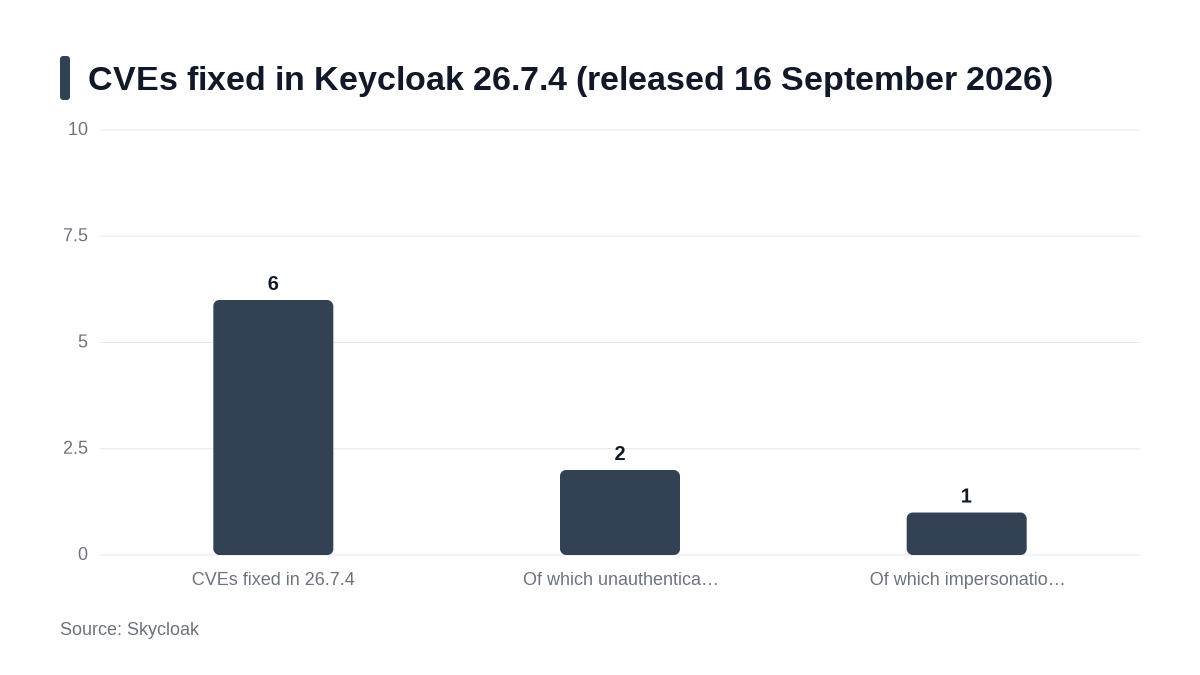
The volume is real. A Skycloak checklist reports that Keycloak 26.7.4, released on 16 September 2026, fixed six CVEs, including two unauthenticated denial-of-service bugs and an impersonation escalation to realm administrator. Skycloak sells managed Keycloak too. One release does not give you a rate, but it shows that a patch cycle for this software is routine work, not an occasional event.
There is also no single authoritative list to lean on. A Keycloak community forum thread from 2022 records a user asking for one, and a reply saying it is safe to say no single list exists of all known CVEs in Keycloak and its dependencies. That is a forum answer, not an official statement. It does suggest you should ask a provider how it tracks vulnerabilities.
Self-hosting on Kubernetes
Self-hosting with an operator is reasonable if you already run clusters, Postgres and observability. Pascal Flamand writes that Keycloak now has an official operator and PostgreSQL has a mature one. That lowers the entry cost. It does not remove on-call.
Practical rule: If you cannot name the person who patches Keycloak on the day a CVE ships, buy managed. If you can, compare costs honestly.
A worked comparison: managed versus self-run on Kubernetes
This is an illustrative setup, not a measurement. Assume a mid-size app with one realm, anywhere from a few thousand to hundreds of thousands of users, two login methods and an SLA expectation.
Cost area | Self-run on Kubernetes | Managed | Where it misleads |
|---|---|---|---|
Database | Postgres with backups and restore tests | Included, schedule set by provider | Backups that have never been restored are a hope, not a plan |
Availability | At least two Keycloak pods and cache tuning | Provider's HA design | "HA" on a pricing page may not cover your failure case |
Security | Image scanning with Trivy, same-day patching | Provider's patch speed | You cannot speed up a vendor's CVE response |
Upgrades | Rehearsal in staging, your schedule | Provider's schedule, notice varies | Forced upgrades can change behavior you rely on |
People | On-call rotation | Vendor management | Managed does not mean zero ownership |
Money | Engineer time, infrastructure | Monthly fee by users or instances, plus migration and exit planning | Per-user pricing can climb steeply as you grow |
I scan every image with Trivy in CI and run identity as code with Keycloak and Terraform. Those habits are what make self-hosting survivable. Without them it is a liability.
My judgment: below a dedicated platform team, pay for managed. Above it, control and CVE speed usually justify running it yourself. The line is not user count. It is whether someone owns the service.
Practical rule: Count engineer hours and on-call burden, not just the invoice, on both sides.
Questions to put to any provider before you sign
Record the answers in writing. A sales call is not a contract.
Upgrade policy
- Who chooses the version, and when?
- How much notice do you get?
- Can you test on a staging realm first?
Data and exit
- Where does the database live?
- What is the backup frequency and the restore time?
- Can you export realms and users cleanly?
On residency, remember that GDPR consent and data-handling duties do not vanish because a vendor runs the server. The EDPB consent guidance summarized by DS Partners stresses that consent must be freely given and unambiguous. That is a reminder that the login and consent screens you configure are still your legal responsibility. It does not tell you what a given provider's contract covers.
Extensibility and identity as code
- Are custom providers and themes allowed?
- Is a Terraform provider supported against your instance?
- What are the admin API limits?
Security and support
- What is the CVE response time?
- Are there audit logs?
- Can the admin console use SSO?
- Is there a real SLA with measured uptime?
Ask for the SLA terms, not the marketing percentage. Plan details, prices and limits vary by provider and plan, so check each provider's current documentation rather than trusting a comparison page.
Run this evaluation routine before you commit
- Write down your realm needs: login methods, federation, custom extensions, user count and residency constraints.
- Define your configuration as code with Terraform so you can move providers or rebuild a realm.
- Shortlist providers, ask the questions above and record the answers in writing.
- Trial with a staging realm: import your export, test login, token refresh and a forced upgrade.
- Test your exit: export users and the realm, restore elsewhere and time it.
- Review quarterly: version lag, incident history, cost per active user and whether self-hosting now makes sense.
If you want to see how I approach this, how I run identity and security on Kubernetes covers the self-run side, and more platform engineering notes cover related operations topics. RealmDeploy, my managed Keycloak side project, is listed as coming soon, so it is not an option to evaluate today.