What Is an Agent Harness? How It Works and When You Need One
An agent harness is everything around the model that turns a language model into a working agent: the loop, tools, context handling, permissions, checks and logs. The model supplies judgment, and the harness decides what that judgment can touch and how its output is verified. Most agent failures I see described are harness failures, and that is where the effort should go.
Key takeaways- An agent harness is the whole system except the model weights: loop, tools, context, permissions, verification and logging.- A framework is a library you build with, and a prompt is one component inside the harness. Neither is the harness.- Reliability comes mostly from deterministic checks, narrow tools and scoped credentials, not from a cleverer prompt.- Build one when runs are multi-step, touch real systems or repeat. Skip it for one-off questions.- A harness raises the floor, not the ceiling. It cannot add capability the model lacks.
What an agent harness is, in one answer
The harness is every part of an agent that is not the model weights. That includes the loop that calls the model, the tools it may use, how context is assembled, what it is allowed to do, how its work is checked, and what gets logged. A MindStudio explainer borrows the term from test harnesses. It describes the harness as the layer that manages what context the model receives, which tools it can call, what happens on bad output, and how a task is split into steps.
The same piece makes a point I agree with: the harness does not make the model smarter. It makes the model usable in a production system.
Harness, framework and prompt
These three get confused, so here is the split.
- Prompt: one component inside the harness. It tells the model what to do, but it enforces nothing.
- Framework: a library you build with. It gives you primitives such as loops, tool wrappers and state, but you still decide the permissions, the checks and the stop conditions.
- Harness: the assembled, opinionated system that runs the agent for a specific job.
A genaipm wiki entry on the Claude Agent SDK reports that Harrison Chase described a market shift from agent frameworks toward fuller agent harnesses. That is one person's framing, relayed secondhand. It is a clue about where the vocabulary is heading, not proof of an industry standard.
A name collision to avoid
The term is overloaded. Harness is also a CI and delivery product, and its documentation describes Worker Agents that use agent.uses to select a versioned template, agent.with to configure it, and agent.inputs to declare reusable parameters, per the Harness agents reference. Those templates are a product feature of that vendor. They are not what this article means by an agent harness, though that product's agents have a harness in the general sense.
How a harness works: the loop and its six parts
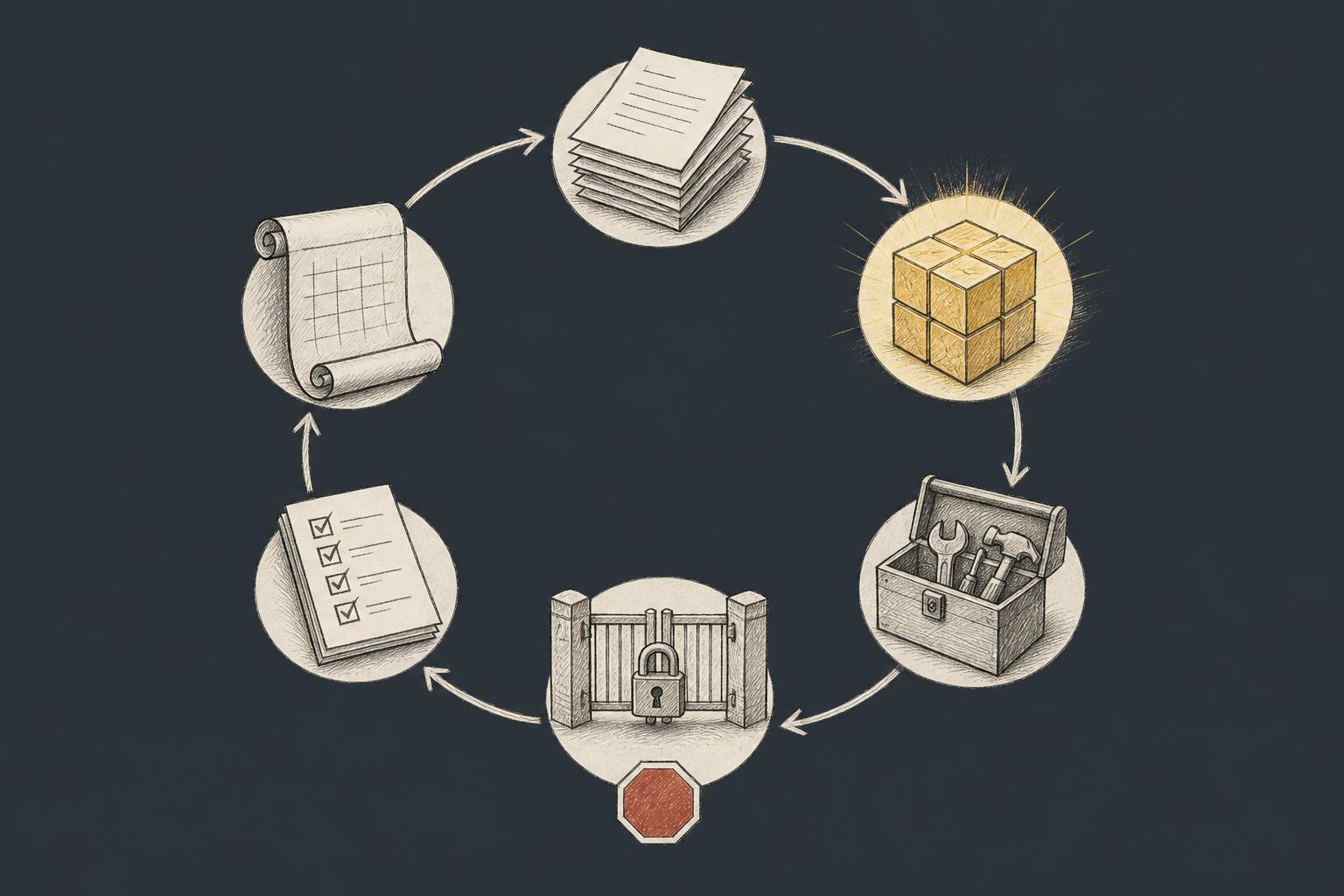
Every harness runs the same loop, however it is dressed up. Certification material for Anthropic's architect exam lists "the loop, tool execution and feedback" as a core lesson on agent architecture. The steps are:
- Assemble the context: instructions, task, prior results.
- Call the model.
- Parse any tool calls from the response.
- Execute those calls, subject to permissions.
- Feed the results back into the context.
- Stop on a condition: task done, step cap hit, budget spent, or a human gate reached.
The stop condition is the step people forget. A loop without one is how a small task becomes a large bill.
The six parts
Part | What it does | Watch out for |
|---|---|---|
System prompt and instruction files | Sets role, commands, conventions | Long prose the agent skims or ignores |
Tool definitions | Declares what the agent can call | Too many tools; broad shell access |
Context management | Decides what the model sees each turn | Stale or bloated context hiding the task |
Permission layer | Limits what calls may do | Authorization living only in the prompt |
Verification | Checks output with deterministic tools | Relying on the model to grade itself |
Observability | Records every call and result | Logs that omit tool inputs, so no one can replay a failure |
Why the model is swappable but the harness is not
In practice I treat the model as the most replaceable part. If the checks, tools and permissions are sound, swapping the model changes quality at the margin and leaves the safety envelope intact.
There is a trade-off. Harnesses get tuned to one model's habits: its tool-call format, how it handles long context, how it reacts to instruction wording. Tuning improves results, and it also makes a later model swap a re-test exercise. Keep model-specific tweaks in a clearly separated layer so you can see what to revisit.
Practical rule: Put reliability in the parts of the harness that do not depend on the model: checks, permissions and logs.
The enablement layer: instructions, skills, tools and checks
This layer determines whether the agent can do the job. The guardrails section covers what it must not do.
Instruction files
Files such as AGENTS.md give the agent standing context for a repository. Put things in them that the agent cannot infer and would otherwise guess wrong:
- Exact build, lint and test commands.
- Conventions that differ from the defaults.
- Paths that are off-limits.
Leave out long prose about architecture philosophy. A file the agent has to wade through gets skimmed, and every extra line competes with the actual task for attention. A short example:
# AGENTS.md
## Commands
- Build: make build
- Test (fast): make test-unit
- Lint: make lint
## Conventions
- Never edit files under infra/prod/
- Pin base images by digest, not by tag
Treat this file as configuration. The NHI Management Group's summary of the OWASP LLM list says to treat system prompts as configuration, not as a secrecy boundary. So never put credentials or access rules there that you rely on for security.
Custom tools versus raw shell
Raw shell access is the quickest way to give an agent capability, and the worst way to bound it. A narrow tool such as run_tests(service) has three advantages over a shell:
- Typed inputs: the harness can reject malformed calls before they run.
- Smaller blast radius: the tool can only do one thing.
- Cleaner logs: a log line saying
run_tests(service="billing")is reviewable, while a pasted shell pipeline is not.
The cost is build time, and every tool you add also needs a description the model must read. The certification curriculum cited above lists "capability bloat in agent tool configurations" as its own topic, which fits my view: more tools is not more capability. Start with the fewest that finish the task.
Deterministic checks as feedback
A model is poor at noticing its own mistakes, but a type checker is not. Linters, type checks and a fast test suite give the loop objective feedback. Run them after every edit, not once at the end, so errors surface while the context is still fresh.
Mozilla offers a public example of verification as design. The genaipm entry above reports that Mozilla described a custom harness running analyzer and verifier loops, and that it helped find and fix more than 500 Firefox security bugs in April 2026. That figure is a self-reported outcome relayed secondhand. It suggests verifier loops matter. It does not show how much of the result came from the harness versus the model, and I would not generalize it to your codebase.
For reviewing the output that survives these checks, see how I review AI-generated code.
Guardrails: permissions, sandboxing and secrets
Treat the agent as an untrusted service account. It can be talked into things by whatever text it reads, so its authority should never exceed what you would grant a script you did not write.
Least privilege, outside the prompt
The OWASP 2025 list for LLM applications adds excessive agency as a category, according to the NHI Management Group summary. It also recommends keeping access decisions in deterministic policy systems rather than prompt text, and separating read, write and act capabilities. That matches what I would do anyway.
- Issue scoped, short-lived tokens per run.
- Give read access by default and write access only where the task needs it.
- Grant no production write access unless a human approves the specific action.
Public incidents show why prompts are weak walls. SIXE's OWASP guide recounts a Chevrolet dealership chatbot that was talked into agreeing to sell a Tahoe for one dollar, and an Air Canada chatbot whose refund promise a tribunal made the airline honor. Those were chatbots, not tool-using agents. They show that text-level instructions fail under pressure, and an agent with real credentials raises the stakes.
Sandbox the execution
Run tool execution in a container that holds no ambient credentials. A restrictive starting point, with placeholder names:
docker run --rm \
  --read-only \
  --tmpfs /tmp \
  --cap-drop ALL \
  --network agent-egress \
  -v "$PWD/workspace:/workspace" \
  registry.example.com/agent-runner:1.0
The agent-egress network is a user-defined network whose outbound traffic you filter to an allowlist, for example only blog.example.com package mirrors. Use --network none when the task needs no network at all. To test it, try to reach an unlisted host from inside the container and confirm it fails. To roll back, loosen one flag at a time.
Scan the runner image in CI. I scan every image with Trivy in CI as part of container hardening, and an agent runner image deserves the same treatment as a service image, since it executes model-chosen commands.
Human gates
Some actions should never run unattended: deploys, deletes, schema migrations, outbound messages. Anthropic's agent guide, as summarized in one practitioner's post, says agents can pause for human feedback at checkpoints and recommends extensive sandbox testing with guardrails. That post also notes the guide dates from December 2024, so use it for ideas, not tool names.
Practical rule: Decide authority in policy and credentials, never in the prompt, and put a human in front of anything irreversible.
When you need a harness and when you do not
You need a harness when the work has any of these traits:
- It is multi-step.
- It touches real systems.
- It repeats daily.
- More than one person depends on the output.
Repetition matters most. A failure you can reproduce is a failure you can fix in the harness once.
Skip it for one-off questions, short single-call tasks and throwaway scripts. A chat window is the right harness there, and building more is waste. The same Anthropic guide summary recommends finding the simplest solution and adding complexity only when needed. It also warns that agents bring higher costs and the potential for compounding errors. A fixed workflow you approve is often enough, and a fixed workflow is itself a small harness.
The honest limitation
A harness raises the floor, not the ceiling. It catches bad output, blocks dangerous actions and makes failures visible. It cannot give a model a capability it lacks. If the model cannot reason about your migration, a better harness will only fail more tidily.
For a related look at what a model can and cannot carry, see rebuilding an open source package with Cursor and Claude.
Worked example: a harness for a dependency-update agent
The task: bump a vulnerable base image across several services. All numbers below are illustrative examples, not measurements.
Tools and scope
The agent gets four tools: read file, edit file, run tests, open pull request. It has no shell, no merge rights, and write access only to a feature branch. The AGENTS.md lists the build and test commands and marks infra/prod/ as off-limits.
The verification chain
After each service edit, the harness runs these steps in order:
- Build the image.
- Scan it with Trivy, for example
trivy image --severity HIGH,CRITICAL registry.example.com/billing:candidate. - Run the unit tests.
- Compare the finding count to the baseline.
Suppose the baseline scan shows 14 high or critical findings. The run fails unless the post-change count is lower, say 6. A bump that builds and passes tests but leaves the count at 14 has not done the job. The model's own claim of success does not matter here, because the count is what the harness measures.
Limits and the trace
- Step cap: 25 tool calls per service.
- Token budget: a fixed ceiling per run, ending it when spent.
- No merge rights: the agent opens a pull request and stops.
- Trace log: every tool call, its inputs and its result, attached to the pull request.
Reviewers read the trace before approving. The trace is how you decide whether to trust the diff, and it is how you find the harness gap when a run goes wrong.
Build your first agent harness: a repeatable checklist
- Pick one narrow, repeatable task and write the pass/fail definition before any prompt. If you cannot say what failure looks like, you cannot check for it.
- Write the instruction file with commands, conventions and off-limits paths. Keep it short enough that every line earns its place.
- Give the agent the fewest tools that finish the task, each with typed inputs. Add a tool only when a failed run proves you need it.
- Run it in a sandbox with scoped credentials and a human gate on irreversible steps. Test the sandbox by attempting a forbidden action.
- Add deterministic checks, a step cap and a budget, then log every tool call. Checks give feedback, caps limit damage, and logs make both visible.
- Review failed runs weekly and fix the harness, not just the prompt. A prompt patch hides a gap, while a new check or narrower tool closes it.
Frequently asked questions
Is an agent harness the same as an agent framework? No. A framework is a library of building blocks, and a harness is the assembled system for a specific job, with its own permissions, checks and stop conditions. You can build a harness on a framework, or without one.
Do I need a harness for a coding assistant like Claude Code or Cursor? You use one already, since the tool ships with its own loop, tools and permission prompts. What you add is the project layer: an instruction file, fast checks the assistant can run, and sensible credentials in the environment. Exact settings vary by tool and version, so check each tool's official documentation.
How do I measure whether my harness is improving things? Define a fixed set of tasks with pass/fail criteria and rerun them after each harness change. Track pass rate, cost per run and how often a human has to intervene. Treat small samples as clues, and change one thing at a time so you know which change moved the numbers.