Claude Code vs Cursor for Professional Work: How to Choose
Claude Code vs Cursor for professional work comes down to where your bottleneck sits. Cursor is stronger when you are reading and editing code in front of you. Claude Code is stronger when you can specify a multi-file task and verify it with tests.
Most teams end up running both. The useful question is which tool holds the default seat, and the answer depends on team size, repo size and risk, not on a leaderboard.
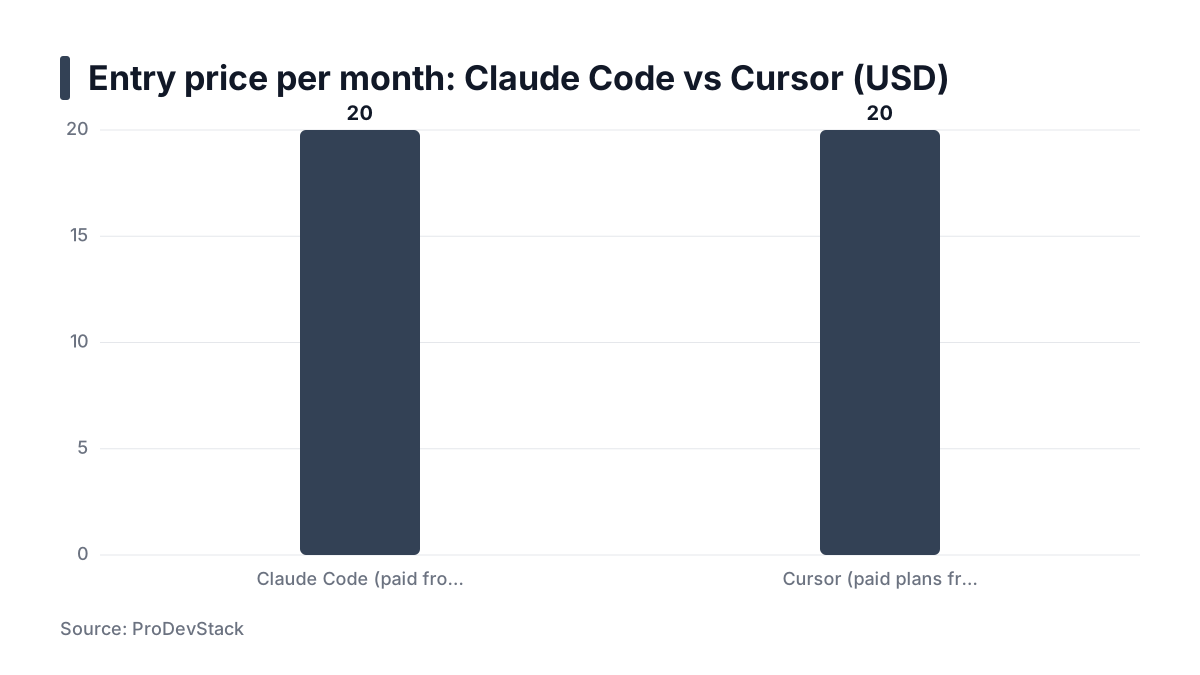
Key takeaways- Pick Cursor as the default when most of your day is editing code you are actively reading; pick Claude Code when most of your day is multi-file tasks you can specify and test.- Price rarely decides it: one comparison site lists both tools as starting at $20 per month, so decide on diff control, context handling, security posture and CI fit.- Agentic tools widen the attack surface, so treat permissions, workspace trust and extension governance as selection criteria, not afterthoughts.- Neither tool replaces review. Every AI change should pass CI and a human reader, whichever tool produced it.- Run a short evaluation on three real tickets before committing, and repeat it each quarter because both products change often.
The short answer: pick by where your bottleneck is
If your time goes into reading, tweaking and steering code in one file at a time, you want an editor. Cursor keeps inline suggestions and visual diffs next to your cursor. A ClickUp comparison describes Cursor as a VS Code-based AI editor with inline suggestions, visual diffs and an agent mode, and Claude Code as a terminal agent that reads and writes files and runs commands.
If your time goes into tasks like "migrate this config format across forty services and keep the tests green", you want an agent that can run the loop itself. That is Claude Code's territory.
A solo consultant who logged six months of use reached a similar rule: steering a session means Claude Code, editing a file means Cursor. That is one person's report on consulting work, not engineering teams. It is a clue, not proof.
Neither tool removes the need for review. My answer shifts with team size, repo size and risk. I am not basing it on benchmarks, because I have none to offer.
The default seat matters more than the choice
Whichever tool you open first shapes habits. If the agent is your default, you will accept bigger diffs. If the editor is your default, you will tend to stay close to the code, and big mechanical changes will feel slow. Decide which failure you can afford.
The criteria that matter for professional work, and why
Solo speed is the wrong scoreboard. A team cares about what lands on a shared branch and what happens when the tool is wrong.
Control over diffs
Ask how easily you can inspect, reject or partially accept a change before it touches a branch. Per-hunk acceptance in an editor is a different safety model from reading git diff afterwards. Neither is wrong, but they demand different discipline.
Context handling on large repos
Both tools have to find the relevant files. The failure to probe is what happens when they guess wrong: do they edit confidently in the wrong place, or do they search again? You only learn this on your own repo.
Security and data posture
Your compliance team will ask about secrets exposure, permission prompts, sandboxing and data terms. Data handling also differs by plan. Anthropic's privacy center says its consumer-plan article covers Free, Pro and Max accounts, including when those accounts use Claude Code, and points to separate commercial terms for work products. Read the terms for the plan you will actually buy.
Agents also widen the attack surface. A commentary by the NHI Mgmt Group, summarizing Adversa AI, says harmful behavior often enters through trusted workspace channels rather than classic product vulnerabilities. It also says coding agents can read files, follow instructions buried in content, and act with shell access. That is a secondhand analysis, so treat it as a prompt to check, not a ranking. The control it implies applies to both tools: separate untrusted workspace content from execution.
Cost predictability
Seat pricing is easy to budget. Usage-based consumption is not. The ProDevStack comparison lists Claude Code as paid from $20 per month and Cursor as free with paid plans from $20 per month per user, and it warns that plan limits, usage fees and billing units differ. That tells you the entry price, not your monthly bill on heavy agent use. Check each vendor's current pricing page.
Fit with CI, review and team conventions
A tool that fits your pull request flow beats a faster tool that bypasses it. Check whether project instructions, hooks and scripts can encode your conventions.
Practical rule: Score tools on what reaches your branch and how you can undo it, not on how fast the first draft appears.
Cursor: strengths and weaknesses
Strengths
- Tight loop on everyday changes. Inline completions, multi-file edits and visual diffs keep a human close to each change. That is the right shape for feature work you understand.
- Low switching cost for VS Code users. Because it is built on VS Code, extensions and settings largely carry over. That shortens rollout, though you should verify your critical extensions.
Weaknesses
- Drift on long autonomous tasks. A chat-driven edit can touch files you did not intend, and a long run can wander from the brief. Keep tasks small, and read the file list before accepting.
- It is an editor decision for the whole team. A forked IDE raises policy questions: update channels, extension sources, and who approves what runs on developer machines. The extension-governance point in the NHI Mgmt Group piece applies here: inventory what is installed and review updates before rollout.
Claude Code: strengths and weaknesses
Strengths
- Terminal-native agent loop. It reads the repo, runs tests and commands, and iterates. That suits migrations, refactors and test backfills where success is machine-checkable.
- Scriptable and editor-agnostic. Nobody has to change editors. It fits CI-adjacent workflows, hooks and project instruction files such as CLAUDE.md, where you can write down conventions once.
Weaknesses
- Review happens after the fact. You read the result through
git diff. With weak discipline, that becomes a large unreviewed change. I cover the habits I use in how I review AI-generated code. - Costs and permissions need deliberate setup. Usage-based spend can climb on big tasks, and the permission model will not configure itself. Start with narrow permissions and widen them as you gain trust.
Side-by-side comparison table
This table reflects published features and workflows, dated to when I wrote it. Both products ship changes often, so verify before you rely on a cell. I am not running a controlled benchmark, and results vary by language and codebase.
Row | Cursor (tendency) | Claude Code (tendency) | Where it misleads |
|---|---|---|---|
Interface | VS Code-based editor | Terminal agent | "Terminal" can sound harder than it is; the real cost is losing visual diffs |
Diff review | Visual, in-editor, before acceptance |
| Editor review feels safer, but a rushed accept-all removes the benefit |
Autonomy | Agent mode, human close by | Longer autonomous loops | Autonomy is a setting of your discipline, not only the tool |
Large-repo tasks | Good when you guide it to files | Suited to specified, testable sweeps | Both can pick the wrong files; test on your repo |
Security controls | Workspace trust, extension governance | Permission model, project config | Defaults are not policy; write yours down |
Pricing model | Per-seat tiers, per vendor page | Plan tiers plus usage limits | Same $20 entry point does not mean same bill |
Team rollout | Everyone adopts one editor | Individuals can adopt it alone | Easy solo adoption can create shadow usage |
Learning curve | Low for VS Code users | Low to start, higher to tune | Fast start hides the cost of good instructions |
Which to choose by situation
Product team shipping daily features in one editor
Make Cursor the default. Keep Claude Code for the occasional large refactor, run on a clean branch with tests as the gate.
Platform, infra or security work across many repos
Choose Claude Code for dependency bumps and config sweeps, where the change is repetitive and checkable. The tests are the gate, not the agent's own summary. Pair it with scanners in CI so a fast change still meets your baseline.
Regulated or sensitive code
Decide on permissions, logging and data terms first, then pick the tool. Model risk frameworks already ask for governance, validation and risk mitigation around models in decision-making. That paper is about financial institutions, not coding tools, but the habit transfers: name an owner, validate outputs, and control access.
Solo or small team on a budget
Start with one paid tier for a month. Measure accepted changes, not impressions. If you notice you open one tool 80% of the time, that is a signal worth acting on.
Practical rule: Choose by the riskiest code you will let the tool touch, then relax for everything else.
Run this evaluation routine before you commit
Adoption is rising, but trust is not keeping pace. The 2025 Stack Overflow survey of nearly 50,000 developers, in its leaders summary, reports declining trust over accuracy and reliability. That shows sentiment, not which tool is better. It does argue for measuring your own results.
For a worked example of two tools used together on one project, see how I rebuilt an open source package with Cursor and Claude. More notes live in my AI-driven development notes.
Set this week's publishing plan
Use this checklist as the evaluation routine. The numbers in any log you keep are your own, so record them honestly.
- Pick three real tickets: a small fix, a cross-file refactor and a test backfill.
- Run each in both tools with identical instructions on a clean branch.
- Record review time, failed tests and lines you rewrote.
- Check permissions, secret handling and data terms with your security team, for the exact plan you would buy.
- Set a rule: every AI change passes CI and human review, whichever tool wrote it.
- Re-run the routine each quarter as pricing and features change, and confirm current prices on the vendors' own pages.