How to Migrate Bare Metal to Kubernetes Without Downtime
Most attempts to migrate bare metal to Kubernetes do not fail at kubeadm init. They fail at cutover, when nobody planned for state, traffic or rollback. The zero-downtime path is to build the cluster beside the old servers, move traffic one service at a time, and keep a way back that takes minutes. This guide covers that path, including the state and rollback work that install tutorials skip.
Key takeaways- Migrate service by service, never host by host. Each service gets its own traffic shift and its own rollback.- Move stateless services first, replaceable-data services second, and critical databases last or not at all.- Bare metal gives you no cloud load balancer and no default storage. Choose MetalLB or BGP, an ingress controller and a storage layer before moving anything.- Shift traffic in weighted stages (1%, 10%, 50%, 100%) and keep the old host warm until the new path has proven itself.- Parallel running costs money and attention for weeks. Budget for it, or the migration stalls halfway.
The short answer: migrate by running both worlds in parallel
The safe path has three parts. Build the cluster next to the existing servers. Move traffic one service at a time. Make every step reversible in minutes, not through a restore from backup.
I run platform, security and identity for a large classifieds platform that moved from bare metal to Kubernetes with zero-downtime releases. You can read more about my background running platform and security. The lesson that generalizes is simple: the install is the easy part. A cluster that passes kubectl get nodes proves nothing about whether your sessions, cron jobs and disk paths survive the move.
Many competing pages stop at kubeadm and a CNI plugin. The hard work is state, traffic and rollback, so that is where this guide spends its time.
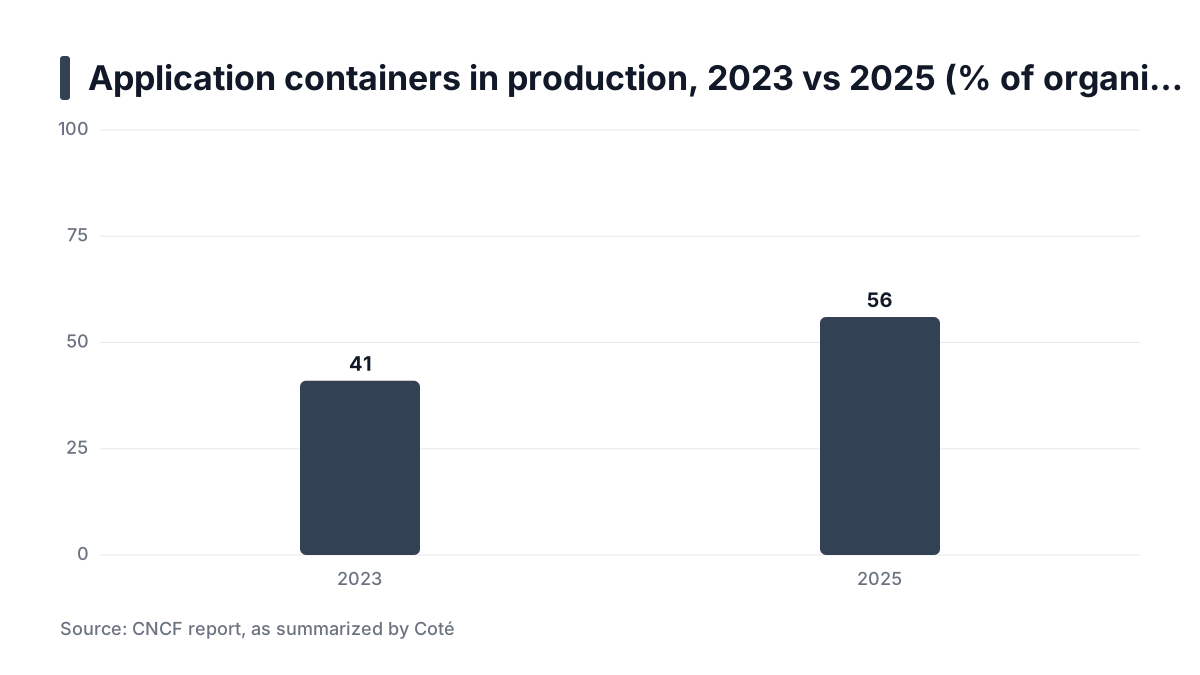
Adoption itself is no longer the risky bet. Coté's summary of a CNCF report says application containers in production rose from 41% in 2023 to 56% in 2025. That is a clue the pattern is common, not proof your migration will be easy. The same summary says "culture" now tops the list of adoption barriers, which is a reminder that the people side is part of the plan.
Prerequisites
Write these down before building the cluster. Gaps here become outages later.
- Service inventory. For every service: ports, config files, cron jobs, secrets, disk paths and the host it runs on.
- Cluster hardware. At least three control plane nodes for high availability, plus workers sized from measured peak usage, not from the old servers' spec sheets. One bare-metal Kubernetes tutorial also recommends a minimum of three servers. Treat that as a floor, not a sizing method.
- Build pipeline. A container registry, CI that builds images, and an image scanner such as Trivy on every build.
- Network facts. A spare IP range for pods and services, a load balancer plan, and DNS with a low TTL that you control.
- Staging and ownership. A staging environment and a named rollback owner per service. Nobody improvises well during a cutover.
The spare range matters because pod and service CIDRs must not overlap your existing networks. Fixing an overlap on a running cluster usually means rebuilding it.
Step 1: Inventory and classify workloads by state
Sort every service into one of three groups:
- Stateless.
- Stateful with replaceable data, such as caches and rebuildable search indexes.
- Stateful with critical data, such as primary databases, uploads and identity stores.
Migrate in that order. Early wins on stateless services teach you the platform while the stakes are low.
Find hidden coupling
Legacy hosts hide assumptions. These break most often when a service gets multiple replicas:
- Hardcoded IP addresses in config files or firewall rules.
- Local file writes, such as uploads saved under
/var/www/uploads. - Host cron jobs that would now run once per replica, or not at all.
- In-memory sessions that vanish when a pod restarts or another replica takes the request.
A French write-up on migrating legacy applications makes the underlying point. Pods are ephemeral and can be deleted at any time, so services need several replicas. That explains why legacy apps struggle. It does not measure how often they do.
Judgment call: leave the primary database outside
Keep primary databases on dedicated hosts at first. The exception is a team that already runs an operator-managed database under real load. Moving a database adds storage, failover and backup risk to a migration that already has plenty. Every application can still run in the cluster and talk to the old database over a stable address.
Practical rule: Move services in order of how little their data matters, and do not touch a database until the stateless tiers around it are boring.
Step 2: Containerize and harden the first stateless service
Pick a service with low traffic, no local state and a clear owner. Then:
- Write a minimal Dockerfile. Fewer packages mean fewer CVEs.
- Run as a non-root user.
- Pin base images by digest, so a rebuild cannot silently change your base.
- Move config to environment variables or mounted secrets. Never bake secrets into the image.
The NIST container guide SP 800-190 points the same way. A Japanese summary says it was published in September 2017 and recommends trusted base images, minimal software, regular scanning, non-root execution and resource limits. It is guidance, not evidence that following it prevents incidents.
Probes that reflect real health
Add readiness and liveness probes. Readiness should fail when the service cannot do useful work, for example when it cannot reach its database. A probe that always returns 200 sends traffic to broken pods. A probe that is too strict can remove every pod at once during a slow dependency. Both are common causes of failed rollouts.
Keep the two probes different. Liveness asks whether the container should be restarted. Readiness asks whether it should receive traffic now. Conflating them causes restart loops during slowdowns that would have recovered alone.
Scan on every build
Run Trivy in CI and fail the build on fixable critical CVEs. I treat this as a gate, not a report. Fixing a critical CVE before the first deploy is cheaper than patching a running cluster. It also makes same-day CVE response a rebuild-and-roll job.
The trade-off: a strict gate can block builds on upstream issues you cannot fix. Limit the rule to vulnerabilities with an available fix, and keep a short, dated exception list.
Step 3: Build the cluster beside the old servers
Bare metal has no cloud load balancer, no managed control plane and no default storage class. You assemble these yourself. That is why this step takes longest.
Pick how much OS you want to own
- kubeadm gives the most control and the most to maintain: OS patching, etcd, certificates and upgrades.
- RKE2 or Talos reduce bootstrap and OS maintenance. Talos goes furthest by replacing the general-purpose OS. Check each project's documentation for current versions and supported platforms.
Whichever you choose, budget for regular upgrades. The French source above stresses that nodes are updated frequently. A cluster you cannot upgrade becomes a liability.
Networking components
You need a CNI, a way to hand out load balancer IPs, and an ingress controller. The bare-metal tutorial lists one working combination: Calico, kube-vip, MetalLB and an NGINX-based ingress. Cilium is a common alternative CNI.
MetalLB runs in layer 2 or BGP mode. Layer 2 is simpler and needs no router changes, but traffic for one IP funnels through one node at a time. BGP spreads traffic better, but you need router support and a network team willing to peer with you.
Decide storage early
Storage is the hardest part of bare metal Kubernetes. This table shows how the main options compare.
Option | Good for | Where it misleads |
|---|---|---|
Local PVs | Fast scratch space, caches, databases that replicate themselves | Data is tied to one node. A node failure means a rebuild or restore. |
NFS provisioner | Shared files, simple setups | The NFS server becomes a single point of failure. Avoid it for databases. |
Longhorn | Replicated block storage with a modest footprint | You now operate a storage system. Test node loss and rebuild time first. |
Rook-Ceph | Larger clusters needing block, file and object storage | Heavy to run and tune. Small teams often underestimate the load. |
Run a node-loss drill in staging before real data lands on any of them.
Define everything in Git
Describe the cluster with Terraform and the workloads with Helm or Kustomize, all in Git. The goal is a cluster you rebuild, not repair. If a worker misbehaves, replace it from code.
Practical rule: Decide storage and load balancing before the first workload moves, not as add-ons after the cluster exists.
Step 4: Run the service in parallel and shift traffic gradually
Deploy the service to the cluster while the old host keeps serving. Start with mirrored or synthetic traffic, so real users meet the new path only after it has handled something.
Shift in weighted stages
Move weighted traffic at the load balancer or at DNS: 1%, 10%, 50%, then 100%. Watch error rate and latency at each stage before advancing.
Prefer load balancer weights to DNS where you can. Some resolvers and clients cache longer than the TTL says, so DNS rollback can lag. A weight change at your own load balancer affects new connections immediately.
Worked example (illustrative numbers): a service handles 1,200 requests per minute at peak.
Stage | Share to cluster | Requests/min on cluster | Hold time | Rollback trigger |
|---|---|---|---|---|
1 | 1% | 12 | 30 min | Any repeating 5xx pattern |
2 | 10% | 120 | 2 hours | Error rate 0.5 points above the old host for 5 min |
3 | 50% | 600 | 24 hours | Same, or p95 latency 20% worse |
4 | 100% | 1,200 | 1 week warm | Same, then a decommission decision |
Set real thresholds from the old host's baseline, and write them down before the first shift. At 1%, a clean graph proves little because the sample is tiny. That is why the early hold times are longer than the percentages suggest.
Keep releases zero-downtime after the move
Once the service lives in the cluster, protect it from your own deployments. Use rolling updates with maxUnavailable: 0 and a PodDisruptionBudget, so node drains cannot take every replica at once.
apiVersion: apps/v1
kind: Deployment
metadata:
  name: web
spec:
  replicas: 3
  strategy:
    type: RollingUpdate
    rollingUpdate:
      maxUnavailable: 0
      maxSurge: 1
---
apiVersion: policy/v1
kind: PodDisruptionBudget
metadata:
  name: web
spec:
  minAvailable: 2
  selector:
    matchLabels:
      app: web
The catch: maxUnavailable: 0 only works if your readiness probe is honest and the cluster has room for the surge pod. Test a rollout and a node drain in staging first. To undo a bad release, run kubectl rollout undo deployment/web.
Step 5: Migrate stateful services and identity (Optional)
This step is optional if your databases stay on dedicated hosts. It is required if you want one operating model everywhere. Many teams stop after Step 4 for a long time, and that is a legitimate end state.
Databases: replicate, then promote
Do not dump and restore under load. Replicate from the old primary to a new one, let it catch up, then promote during a short, announced window. Rollback means repointing the application at the old primary. That only works if you keep replication running in reverse or accept losing writes made after promotion. Decide which before the window, not during it.
Operator-managed databases are mature enough for many teams. They still demand that you understand backups, failover and storage behavior on your own hardware. If you do not, the dedicated host is the honest answer.
Identity: treat it as code
Identity moves badly by hand. I manage realms, clients and roles as code with Keycloak and Terraform. The new environment is then created from the same definitions as the old one, and differences show up in a plan, not in a user complaint.
Plan for sessions. Users logged in on the old identity server may need to log in again after the move. Schedule the cutover for a quiet period and warn support in advance.
Practical rule: Promote a replica instead of restoring a dump, and decide before the window whether post-promotion writes can be lost.
Step 6: Verify the result and roll back safely
Compare golden signals before and after each move: error rate, p95 latency and saturation. Add one business metric, such as successful requests per minute or completed listings. A cluster can look healthy while the thing customers care about quietly drops.
The migration-specific point is the comparison baseline. Capture the old host's numbers before the first shift, or you will argue about whether the new path is worse. A vendor production checklist from AlertMend lists Prometheus, Grafana, RBAC, network policies and resource limits. Read it as a common checklist, not as evidence of outcomes.
Roll back by moving the weight
Keep the old host warm and in sync for a set window, such as two weeks. Rollback then means moving the weight back, not rebuilding anything. Once you decommission the old host, rollback becomes a restore, which is what this approach exists to avoid.
Test the rollback once in staging. An untested rollback is a hope, not a plan. Include the awkward parts: config drift on the old host, data written to the new path during the shift, and who is allowed to change the weights. For the people side of a long migration, my Staff Engineering notes on leading technical migrations cover alignment and sequencing.
The honest limitation
Parallel running doubles cost and operational load for weeks. You pay for both fleets, patch both and monitor both. Small teams often underestimate this and decommission early. If your team cannot carry two environments, migrate fewer services at a time instead of shortening the parallel window.
There are real reasons to want bare metal. A Software Engineering Daily article notes that self-hosting avoids unpredictable performance from multi-tenant bursts on shared virtual servers. A CyberPanel guide claims performance and cost advantages over VMs, though as a vendor source it shows no measurements here. Neither says the migration is cheap. For more platform engineering notes, see my articles.
Reporting rule: Report migration progress per service, with before-and-after error rate, p95 latency and one business metric, not as a percentage of hosts moved.
Set this week's migration plan
- Build the service inventory: ports, config, cron jobs, secrets, disk paths and host for every service.
- Classify each service as stateless, replaceable-state or critical-state, and pick one low-risk stateless service to go first.
- Containerize it with a non-root user, a pinned base digest, honest probes and a Trivy gate in CI.
- Write down the cluster decisions: kubeadm versus RKE2 or Talos, CNI, load balancer mode, ingress and storage. Name the rollback owner.
- Stand up a staging cluster from code, then run a node-loss drill and a rollout with
maxUnavailable: 0. - Record the old host's baseline, write traffic stages and rollback triggers from it, and test the rollback once in staging.
- Lower DNS TTL where you depend on it, send mirrored traffic to the first service, and start at 1%.