keycloak impersonation for support teams
Keycloak impersonation for support teams works best when the support app never swaps a session by hand. A narrow service account exchanges the agent's token for a 60-second token for the target user. Your own app then opens a 30-minute, non-renewable session and logs every action against both identities. Doing it this way keeps the agent accountable, keeps the blast radius small, and lets you revoke access centrally.
Why a session swap is not impersonation
A common first version of "log in as the customer" is a PHP session switch. An admin flag allows $_SESSION['user_id'] to be overwritten with the target's ID, and a banner says "you are viewing as...". It ships in an afternoon and works until the first security review.
The problems are structural, not cosmetic:
- No identity provider involvement. Keycloak never learns that anyone acted as someone else, so it cannot expire, revoke or report on the switch.
- No second identity. The session says "user 4821" and nothing else. Logs cannot separate the customer's clicks from the agent's.
- No expiry. The switch lasts as long as the PHP session, which is often hours and sometimes days.
- Every service must trust the app. Any downstream API that accepts the app's session cookie accepts the swap too.
I prefer to fix this at the identity layer. Keycloak already issues, signs, expires and revokes tokens. Impersonation should be one more token the identity provider knows about, not a variable the application overwrites.
This is also a GDPR concern, though not legal advice. An agent viewing a customer's account is processing personal data. You want that access purpose-bound, time-limited and recorded, and a session swap gives you none of the three.
The security model in one page
The design has four parts, and each one removes a specific failure.
- A least-privilege service account. A dedicated confidential client does the exchange and holds nothing else. It cannot manage users, edit roles or open the admin console.
- Token exchange, not password reset or admin-console switching. The agent authenticates normally. The service account then trades the agent's token for a token on behalf of the target user.
- Tokens of 60 seconds, sessions of 30 minutes. The exchanged token only bridges the gap between the exchange call and your app creating its own session. The session carries a hard 30-minute cap with no refresh.
- An audit trail you own. Keycloak records its own operations. Your application records what the agent did while impersonating.
The numbers are design choices, not standards. Sixty seconds is long enough for a backend to complete a redirect or an API call, and short enough that a leaked token is nearly useless. Thirty minutes is long enough to resolve most tickets and short enough that "I forgot to log out" stops being a risk. Tune both to your workflow, but write the reason down.
One limit up front. Keycloak's impersonation permissions are coarse. A 2019 forum post from a user trying to scope impersonation described the gap: you can define which users can be impersonated and which clients can impersonate, but any impersonating client can impersonate any impersonable user. That is one user's report on a specific version, not a guarantee about every release. It does match how I would plan the model: assume the permission is broad, and narrow it in your application.
Practical rule: Treat the Keycloak impersonation permission as all-or-nothing, and enforce "who may impersonate whom" in the application that holds the service account's secret.
Prerequisites
Check these before building anything.
- A Keycloak version whose token exchange you have read the docs for. Token exchange support and behavior are version-dependent. One user reported that after upgrading from 12.0.1 to 22.0.1, a previously working impersonation flow failed with
not_allowed, reason='client is not the token holder'. That thread is unanswered, so it is a warning to test upgrades, not a diagnosis. - The features and permissions your version requires. The same user said both required Keycloak features were enabled and the admin user had impersonation permission. Which features and which permission screens apply depends on your version, so use the official documentation for yours.
- Strong authentication for agents. Exchange inherits trust from the agent's token. If agents log in with a password alone, impersonation is only as strong as that password. Require MFA for the support realm or group.
- Somewhere to store audit records. A table or log stream you control, with retention you chose. Do not plan to use Keycloak for this, as the audit section explains.
- Configuration as code. I manage identity with Keycloak and Terraform, which means the service account, its roles and its permissions go through code review. Impersonation permissions edited by hand in a console are the kind of drift you only discover in an incident.
You do not need a custom Keycloak extension. If your version's token exchange covers your case, use it. Write an extension only if you need something the built-in exchange cannot express, and then accept the upgrade cost that comes with it.
Step 1: Create a least-privilege service account
Start with one dedicated confidential client, for example support-impersonator. Enable its service account. Give it nothing beyond what impersonation needs.
Why a separate client? Because impersonation is the most dangerous thing your support tooling does. If the same client also reads users, resets passwords or calls the admin API, a leaked secret becomes a full admin compromise. A dedicated client limits what the secret can do and makes its usage easy to spot in logs.
What to leave out:
- Realm-management roles such as user management or role mapping.
- Any broad admin role added "temporarily" to make the exchange work. If it only works with extra roles, find the missing permission instead.
- Reuse by other services. One client, one purpose, one secret.
Then limit who can be impersonated. Keycloak lets you define which users are impersonable, and that is the only dimension it scopes. Use it to exclude staff, admins and service accounts. Support should never be able to impersonate an administrator, because that is privilege escalation with extra steps.
Keep the secret out of the browser
The client secret lives in your backend only. On Kubernetes that means a Secret mounted into the support service, rotated on a schedule, and never in the frontend bundle. Rotation is easy to test with zero-downtime releases: deploy the new secret, confirm exchanges succeed, then retire the old one.
Test that the account is actually narrow
Do not assume. Using the service account's own token, try to list users and to change a role. Both should fail with a permission error. Run that check in CI against a throwaway realm so a Terraform change that widens the account fails the build.
Rollback is simple. Disable the client or its service account. Nothing else depends on it, which is the point of keeping it dedicated.
Step 2: Exchange tokens instead of minting sessions
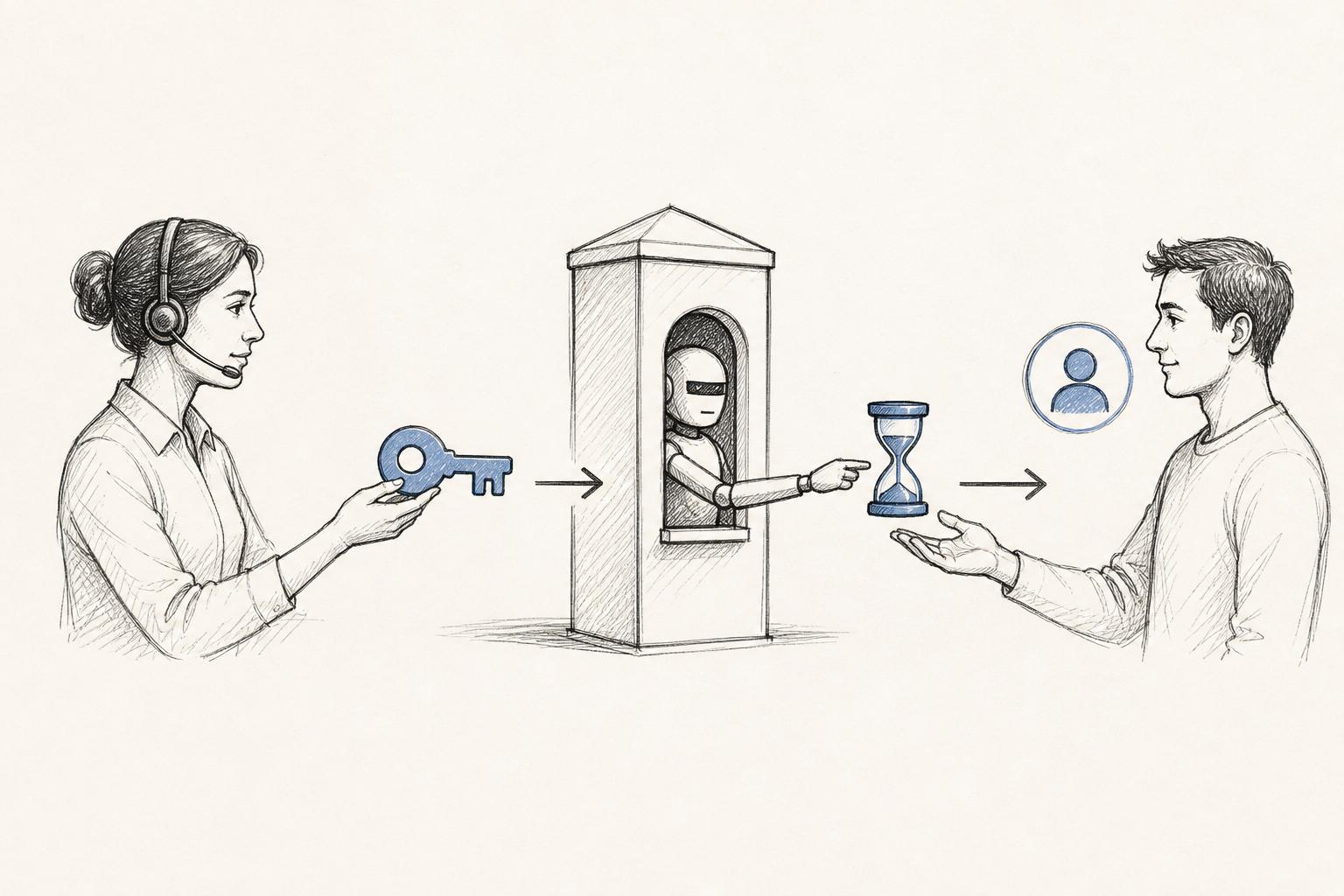
The flow has five moves.
- The agent signs in to the support app through Keycloak with MFA.
- The agent picks a customer and gives a reason and a ticket reference.
- The support backend checks its own rules: the agent's role, the target's eligibility, no staff targets.
- The backend calls Keycloak's token endpoint with the service account's credentials and the agent's token, asking for a token for the target user.
- The backend validates the result, opens a short-lived impersonation session in the app, and discards the token.
Here is the shape of the exchange request. Treat it as an illustration of the legacy-style exchange, not a drop-in. Parameter names, endpoint paths and requirements vary by Keycloak version, so verify against the documentation for yours.
curl -s -X POST \
  "https://example.com/realms/example-realm/protocol/openid-connect/token" \
  -d "grant_type=urn:ietf:params:oauth:grant-type:token-exchange" \
  -d "client_id=support-impersonator" \
  -d "client_secret=${IMPERSONATOR_SECRET}" \
  -d "subject_token=${AGENT_ACCESS_TOKEN}" \
  -d "requested_subject=${TARGET_USER_ID}"
Look at the error from the upgrade report again: "client is not the token holder". A plausible reading, and only a reading, is that the exchanging client was not the client the subject token was issued to. If you hit it, check which client obtained the agent's token and which client is making the exchange call, then compare that with the rules in your version's documentation.
Why exchange rather than the admin console button
Keycloak's admin console has its own impersonate action. It is fine for an administrator debugging one account. It is a poor base for a support product, for two reasons.
First, it hands the operator a browser session in Keycloak's account console, not in your app. Second, it can fail in split-domain setups. A user on version 16.1 reported that with a realm front-end URL different from the Keycloak host, impersonating from the admin console redirected to a login instead of the account console. Their guess was cookie scope across domains. That is one report on one version, but cookie-dependent flows do tend to break when domains differ. A server-side exchange returns a token in an HTTP response, so cookie domains stop mattering.
Verify the result before you trust it
After the exchange, validate the returned token like any other: signature, issuer, audience, expiry. Confirm the subject is the user you asked for. If the subject is the agent, or the call returned something unexpected, fail closed and log it. A wrong-subject token is exactly the sort of bug that turns into a data leak.
Practical rule: The exchange runs on the server, with a dedicated secret, and its result is checked against the requested user before any session is created.
Step 3: Hold tokens to 60 seconds and sessions to 30 minutes
Two clocks matter here, and they protect different things.
The 60-second token
The exchanged access token exists to prove, once, that Keycloak agreed to this impersonation. Once your app has validated it and opened a session, the token has done its job. A 60-second lifetime means a token that leaks through a log line or a proxy cache dies almost immediately.
Where you set this is version-dependent. Access token lifespan can be configured at realm level and, in many setups, per client. Check your version's documentation for the exact location rather than copying a label from a blog.
The risk is clock skew and slow paths. If your backend and Keycloak disagree on time by more than a few seconds, a fresh token can look expired. Run NTP on your nodes, allow a small leeway in validation, and make the exchange retryable. Do not fix skew by lengthening the token.
The 30-minute session
The session is yours, not Keycloak's. Store it server-side with these fields:
- the agent's ID and the subject user's ID
- a start time and a hard expiry set at creation
- the ticket reference and stated reason
- a flag that marks it as impersonation
The expiry is absolute. Do not slide it on activity, and do not allow a refresh token to extend it. When time runs out, the session ends, and continuing means a fresh exchange with a fresh reason. That friction is deliberate. It stops one approved ticket from turning into open-ended access.
Worked example (illustrative numbers)
An agent opens ticket T-1042 at 10:00:00 and starts impersonating a customer.
- 10:00:00 - exchange succeeds, token issued with a 60-second life.
- 10:00:02 - backend validates the token and creates the app session with expiry 10:30:02. The token is discarded.
- 10:00:30 - the agent reads the account. The token would still be valid, but nothing uses it.
- 10:01:00 - the token expires. The session is unaffected, because it is separate.
- 10:30:02 - the session ends. The agent needs a new exchange and a new reason to continue.
If the agent's laptop is stolen at 10:10, the thief holds a session cookie that dies at 10:30:02 and a token that died nine minutes earlier. Compare that with a PHP session switch, which would last until the session garbage collector decided otherwise.
Restrict what an impersonation session can do
A time box limits when. You also need to limit what. Mark the session and have the app refuse sensitive actions while the flag is set:
- changing the password or the email address
- enrolling or removing MFA devices
- payments, payouts and account deletion
- exporting the user's data
The reason is simple. Viewing an account to diagnose a problem is support. Changing the credentials that control the account is takeover. Block the second, and the rule survives even a compromised agent account.
Step 4: Build the audit trail
Here the gap between what Keycloak records and what you need shows up most.
A Keycloak maintainer put it plainly in a forum thread about logging admin-portal activity: Keycloak is not an event store for your application and only emits events for its own operations. That is one answer in one thread, but it matches the design. Keycloak can tell you a token exchange happened. It cannot tell you the agent opened the customer's address book or exported their listings.
So the audit trail has two halves.
Half one: what Keycloak records
Enable event recording for the realm so token exchanges are captured. Keycloak models its administrative events as a separate AdminEvent type in its server SPI, distinct from user login events. Which event types are available and how detailed they are depends on your version, so read the events section of your documentation and confirm token exchanges appear in a test run.
Do not assume admin events are complete. An issue filed against Keycloak reported that some role-mapping removal operations in the admin UI produced audit entries lacking detail, describing the result as uncontrolled admin activity. The issue is marked closed, and what matters is the lesson: check the real event output for your version and your operations. Do not trust that every action is logged with the fields you need.
Half two: what your app records
Write one record per impersonation session and one per action taken inside it. Include:
- agent ID and subject ID, always both
- session start, end and how it ended (expired, logged out, revoked)
- ticket reference and the free-text reason
- each request: route, method, timestamp, outcome
- the Keycloak event or token identifier that authorized the session, so the two halves join
Write these records somewhere agents cannot edit. An append-only table or a log stream shipped off the application host works. If the audit record sits in the same database the support tool can write to, a bad agent can rewrite history.
Make the record visible to the customer
Consider showing customers a "support accessed your account" entry in their activity log. It costs little, deters casual snooping, and builds trust. I would also treat it as a GDPR-friendly default, since it makes the access visible to the data subject. Whether you are obliged to is a question for your legal team.
Alert on the unusual
An audit trail nobody reads is storage. Set alerts for a few patterns, using thresholds that fit your volume:
- an agent starting many impersonation sessions in a short window
- a session started with no ticket reference
- a blocked sensitive action attempted during a session
- an exchange attempt targeting an excluded user
Reporting rule: Every impersonation record names both the agent and the customer, carries a ticket and a reason, and joins to the Keycloak event that authorized it.
Mistakes this design avoids
The table maps each common shortcut to what goes wrong and what to do instead.
Shortcut | What it looks like | Where it misleads | Fix |
|---|---|---|---|
Overwrite the session user ID | Fast; works in the demo | Identity provider never knows; no expiry; logs show only the customer | Exchange through Keycloak and record both identities |
Give the impersonator client admin roles | Exchange "just works" | A leaked secret becomes full admin access | Dedicated client with impersonation permission only; test it cannot list users |
Use the admin console's impersonate button as the product | No code to write | Yields a browser session in Keycloak, and cookie issues appear on split domains | Server-side exchange that returns a token to your backend |
Long-lived impersonation tokens | Fewer exchange calls | A leaked token stays useful for hours | 60-second token; session lives in your app |
Sliding session expiry | Agents are not interrupted | One ticket becomes open-ended access | Absolute 30-minute cap; new exchange needs a new reason |
Rely on Keycloak events for everything | One place to look | Keycloak logs its own operations, not your app's actions | App-level audit with actor, subject, ticket |
Allow impersonating any user | Simple rule | Support can act as admins and staff | Mark staff and admins non-impersonable; enforce in the app too |
Skip upgrade tests | Upgrade "went fine" | An exchange that worked before may fail after a major version change | Integration test of the exchange in CI before upgrading |
Two of these deserve a comment.
The upgrade row comes straight from the 12.0.1 to 22.0.1 report. That user said the upgrade steps ran without trouble, yet the exchange then failed. One report proves nothing about your upgrade. It is a cheap reason to keep a CI job that performs a full impersonation round trip against a staging realm built from your Terraform. If it breaks, you learn before agents do.
The "not an event store" row is the one teams discover late. Impersonation without an app-level audit trail is only half-built. You can prove the door opened and not what happened inside.
Where this design breaks
I would not claim this fits every setup.
It adds moving parts. A service account, a secret, an exchange call, a session store and an audit table are more than a session swap. For a product with ten users and one admin, a manual process with a break-glass account may be proportionate. The design earns its cost when support is a team, the user base is large and data is sensitive.
Fine-grained scoping is limited. As covered above, Keycloak's impersonation permission does not pair specific clients with specific users, based on the poster's account of the version they used. Your application is the real policy engine. If you need per-agent, per-customer rules, such as "agents only see customers in their region", build them in the support backend.
Token exchange behavior is version-sensitive. Exchange support has changed across Keycloak versions and may be labelled preview or standard depending on yours. The upgrade report is one example of a change in outcome. Pin your Keycloak version in your manifests, read the release notes before every upgrade, and run the round-trip test.
Split-domain deployments need care. If your realm uses a front-end URL different from the Keycloak host, any flow relying on cookies set by Keycloak can misbehave, as one 16.1 user reported. The server-side exchange avoids most of that, but your app's own session cookie must still be scoped correctly. Test on the real domains, not on localhost.
It does not replace policy. Technical controls limit damage. They do not decide when support may look at an account. Write that policy: which ticket types qualify, who approves, how long records are kept. If you work against a control framework, the NIST SP 800-53 control catalog groups identification and authentication controls into a family you can map to. That page is an unofficial archive, and it says to replace .rip with .gov for the official site. The catalog will not tell you to use 60 seconds, so the numbers stay your decision.
Revocation has a gap. Ending a session in your app is instant. A 60-second token already issued cannot be recalled before it expires, though it is useless once your app discards it and has no session to attach to. If that window is unacceptable for your threat model, shorten it and make sure no downstream API accepts the exchanged token directly.
Roll out impersonation this week
- Inventory the current switch. Find every place your app swaps a user ID, list who can trigger it, and note what it logs. Anything that cannot name the agent is the first thing to replace.
- Create the dedicated client in code. Add the
support-impersonatorclient, its service account and the impersonation permission to your Terraform. Add a CI check proving the account cannot list users or change roles. - Run the exchange in staging. Perform the full round trip against a staging realm, confirm the returned subject matches the target, and save the test. Re-run it before every Keycloak upgrade.
- Set the clocks. Configure 60-second tokens for the exchange path (check your version's docs for where) and an absolute 30-minute session cap in your app, with no sliding expiry and no refresh.
- Block sensitive actions. Flag impersonation sessions and refuse password, email, MFA, payment, export and deletion actions while the flag is set. Mark staff and admin accounts non-impersonable.
- Ship the audit trail. Write actor, subject, ticket, reason and per-request records to an append-only store, enable Keycloak event recording, and confirm both halves join on one identifier.
- Alert and review. Add alerts for missing tickets, blocked-action attempts and bursts of sessions, then review the first week's records with the support lead and adjust the limits.