Zero Downtime Deployment for PHP on Kubernetes: A Full Guide
A release goes out, the dashboard stays green, and some users still get a 502 or lose their logged-in session. Zero downtime deployment for PHP on Kubernetes breaks in a few specific places, and a rolling update alone covers none of them. My thesis: you need Redis-backed sessions, honest probes, a surge-first rollout, a real drain, and backward-compatible migrations, and you must prove each one under load.
Key takeaways- Zero downtime means no serving pod is removed before its replacement is ready, in-flight requests finish before a pod exits, and no state lives on a pod's disk.- SetmaxUnavailable: 0, add apreStopsleep, and giveterminationGracePeriodSecondsmore room than the longest request plus that sleep.- Readiness should check hard dependencies lightly. Liveness should never touch the database, or one database blip restarts every pod.- Measure first: run constant traffic through a normal deploy, record the non-2xx count, and judge every later change against it.- Expand-and-contract schema changes let old and new code run side by side. Without them, a perfect rollout still breaks.
What zero downtime deployment for PHP on Kubernetes really requires
The direct answer is a rollout that never removes a serving pod before its replacement is ready. It also needs a graceful drain on the way out and shared state, so any pod can serve any user.
I work on a classifieds platform with 400K+ users on Kubernetes, and this is the shape of the release process I settled on. The practical effect was that releases went from once a week to five a week. My background running platform and security explains why I care about boring deploys. The short version is that a risky release gets batched, and a batched release is riskier still.
The four failure sources
Almost every deploy-time error I see traces back to one of four causes:
- False readiness. Kubernetes sends traffic to a pod that answers a probe but cannot serve real requests yet. Cold opcache, an unready database pool, or a half-joined search node are typical causes.
- Abrupt termination. The pod gets SIGTERM while requests are in flight, or the ingress keeps routing to it for a few seconds after shutdown begins.
- Local state. PHP file sessions, uploaded files, and local caches die with the pod.
- Incompatible changes. A schema migration or cache format change breaks the old version still running during the rollout.
Why smaller deploys matter
Zero downtime is not only about uptime. It changes how often you are willing to ship. If a deploy carries a risk of dropped requests, people batch changes and release weekly, usually at a quiet hour.
A boring, reversible deploy removes that incentive. I went from one big release a week to roughly five small ones, and each was easier to reason about and to undo.
The DORA research frames this as a pair of trade-offs. re:cinq's DORA explainer groups change lead time, deployment frequency and failed deployment recovery time as throughput measures. It groups change fail rate and deployment rework rate as instability measures. That grouping is a clue that speed and safety are measured separately and can both improve. It does not prove that your change fail rate will fall.
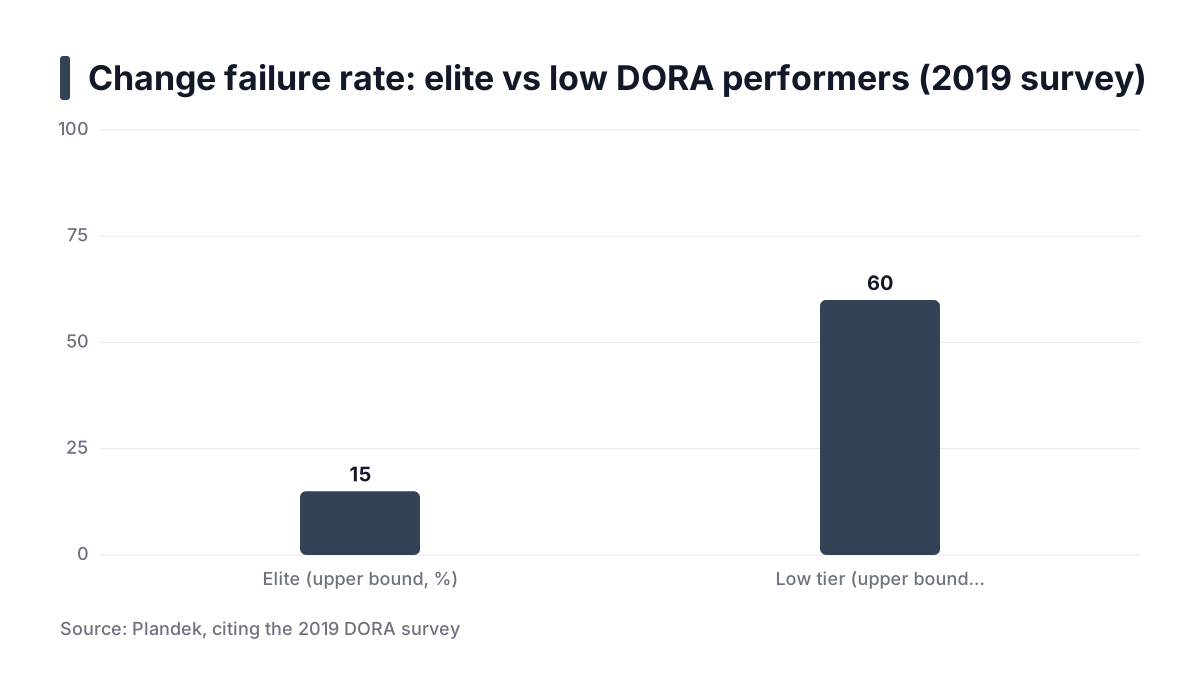
Plandek's explainer on change failure rate reports the same idea from the 2019 DORA survey. Elite teams sat at 0-15% change failure rate, and the low tier at 46-60%. Those bands describe survey respondents, not your cluster. Track your own rate before and after.
What top-ranking guides skip
Many guides stop at the rolling update. Panelica's zero-downtime guide covers blue-green, rolling updates and symlink switching well. It stays at the strategy level, which is a fair scope for a general guide.
Three things decide whether the strategy holds in production, and this guide covers them:
- How PHP-FPM behaves on shutdown.
- How a Next.js frontend and a search cluster need different handling from the monolith.
- How to verify the result under load instead of trusting a green rollout status.
Choosing a strategy
Strategy | How it works | Cost | Where it misleads |
|---|---|---|---|
Recreate | None extra | Guarantees a gap; fine for batch jobs, wrong for web traffic | |
Rolling update | New pods are added gradually and old ones removed gradually | Spare capacity during surge | Only safe with honest probes and |
Blue-green | Roughly double capacity during the switch | Shared database and sessions still break it; the switch hides state problems until cutover |
I use rolling updates for the PHP monolith and the Next.js frontend. They fit the cluster's capacity and need no second environment. Blue-green is worth its cost when you must test the full new stack before any user touches it.
Prerequisites
You need these before the first step:
- Cluster and tooling. Kubernetes 1.27 or newer,
kubectl, and an ingress controller. Probe and lifecycle behavior differs across versions, so check your version's documentation. - A load tool. k6 or hey, either of which can report status codes per request.
- At least two replicas per workload. One replica cannot be zero downtime, because replacing it always leaves a gap. Plan a PodDisruptionBudget for each workload too.
- Redis reachable from the cluster. It holds sessions and shared cache. Use any managed or in-cluster Redis you already trust.
- A health endpoint in each app. Step 3 covers what each should check.
- Images built in CI and scanned with Trivy. I scan every image in CI, so a rollback target is always a known, tagged, tested image and never
latest.
Rollback is kubectl rollout undo, which Blue Matador's rolling update guide lists alongside kubectl rollout status and --to-revision. That only works well when each revision points at an immutable tag.
Step 1: Baseline the downtime you have now
You cannot claim improvement without a number. Run constant traffic through a normal deploy and count the failures.
Run constant traffic
Use a real page and a real API route, not only the health endpoint. Here is a minimal k6 script (replace the host with your own):
import http from 'k6/http';
import { check } from 'k6';

export const options = { vus: 20, duration: '5m' };

export default function () {
  const page = http.get('https://blog.example.com/');
  const api = http.get('https://blog.example.com/api/listings?limit=10');
  check(page, { 'page 2xx': (r) => r.status >= 200 && r.status < 300 });
  check(api, { 'api 2xx': (r) => r.status >= 200 && r.status < 300 });
}
Start it, then trigger a normal deploy with kubectl apply or your pipeline. Keep the run longer than the rollout so you see the steady state on both sides.
Read the failures
The status code tells you which stage is broken:
- 502 or 503 from the ingress usually means pods were removed from service while still receiving traffic, or new pods were marked ready too early.
- Connection resets or timeouts usually mean a pod was killed with requests in flight. That points to a missing drain, covered in Step 5.
- Logged-out users are not visible to a stateless script. Add a login step with a cookie jar if sessions matter to you.
Write the number down
Record the non-2xx count and the failure types. An example baseline looks like "43 failed requests out of 61,000 during a four-minute rollout, mostly 502". That figure is illustrative, not a benchmark. Every later step gets judged against your own number.
The money framing in vendor blogs is soft evidence. Panelica reports e-commerce downtime costing $5,600 to $9,000 per minute. It gives no method, and it describes e-commerce checkout. That is a clue about order of magnitude and not a price for your service. Your own failed-request count is the better argument to show a team.
Reporting rule: Report failed requests per deploy from a controlled load run, never "no downtime observed".
Step 2: Move PHP sessions from disk to Redis
Do this first because it removes a class of failures that no probe can fix. With file sessions, any pod replacement or load balancer shift can log a user out or empty a cart. The session file lives on one pod's disk, and the next request may land on another.
Configure phpredis
Install the phpredis extension in the image, then point sessions at Redis:
session.save_handler = redis
session.save_path = "tcp://redis.example.com:6379?auth=REDIS_PASSWORD_FROM_SECRET"
session.gc_maxlifetime = 1440
redis.session.locking_enabled = 1
redis.session.lock_expire = 30
redis.session.lock_wait_time = 20000
redis.session.lock_retries = 100
Treat the values as starting points. Defaults and available options vary by phpredis version, so confirm them in the extension's documentation. Inject the password from a Kubernetes Secret rather than baking it into the image.
The TTL (session.gc_maxlifetime) matters because Redis has no cleanup job for abandoned sessions. Too short logs people out mid-session. Too long fills memory.
Weigh the locking trade-off
Session locking mirrors what PHP's file handler does. It serializes requests that share one session, which prevents lost writes. The cost is that a slow request holds the lock, and parallel AJAX calls from the same user queue behind it.
Lock wait times multiplied by retries set how long a request waits before giving up. If your frontend fires many concurrent API calls per user, either call session_write_close() early in read-only endpoints or disable locking for them. Disabling it blindly risks lost updates, so keep it on for anything that writes session data.
Keep uploads and caches off the disk too
Sessions are only the loudest form of local state. User uploads, generated thumbnails and file-based caches have the same problem. Send uploads to object storage, or mount a shared volume where object storage is not an option. Put application caches in Redis or another shared store.
When not to bother
A stateless JWT API needs no session store. A classic monolith almost always does. If you are unsure, restart one pod in a test environment while a logged-in browser session is active. If the user is logged out, you have local state.
Step 3: Add honest readiness and liveness probes
Probes decide when Kubernetes sends traffic and when it kills a pod. Wrong probes are the most common source of false readiness. Three probe types matter here:
- Readiness answers "can this pod serve traffic right now?"
- Liveness answers "is this process wedged beyond recovery?"
- Startup answers "has this slow process finished booting?"
Readiness: check real dependencies, lightly
Readiness should prove that the web server reaches PHP-FPM and that the database connection works. Keep it cheap, with a one-second query and short timeouts. Include only hard dependencies. If the endpoint also checks an optional service such as search, a search blip removes every pod from service at once.
The trade-off is real. A database check in readiness means a database outage takes all pods out of rotation. Users are getting errors in that case anyway, but you lose the ability to serve cached or degraded pages. Decide which you prefer and write it down.
Liveness: never check the database
Liveness should check only that the process answers. If it queries the database, a database blip fails every pod's liveness probe, and Kubernetes restarts them all together. You then turn a partial outage into a full one with cold caches. A tiny PHP file that returns ok is enough, because it still proves FPM is not wedged.
Startup probes for slow boots
A startupProbe holds off the other probes until the app has booted. It suits a Next.js server that starts slowly and search nodes that need time to join a cluster. Build the Next.js app in CI and ship it in the image instead of building at container start. Boot time then covers only the server starting.
Tune the thresholds
startupProbe:
  httpGet: { path: /livez, port: 8080 }
  periodSeconds: 5
  failureThreshold: 30        # up to 150 s to boot (example)
readinessProbe:
  httpGet: { path: /healthz, port: 8080 }
  periodSeconds: 5
  failureThreshold: 2
  successThreshold: 2
livenessProbe:
  httpGet: { path: /livez, port: 8080 }
  periodSeconds: 10
  failureThreshold: 3
The reasoning behind each value:
successThreshold: 2on readiness requires two good checks in a row, so a lucky single response does not mark the pod ready. Only readiness probes may use a value above 1.failureThreshold: 3on liveness gives a busy but healthy pod room to miss a check before a restart.- Opcache warmth is the gap probes leave. A pod can pass checks while its first real requests are slow because opcache is cold. Make
/healthzload the framework bootstrap, and consider opcache preloading, which has its own caveats. Then check first-request latency after readiness in your load run, and pair the probe withminReadySecondsfrom Step 4.
I cannot give a universal warm-up time. It depends on code size and CPU limits, so measure it.
Practical rule: Readiness may depend on the database; liveness may not.
Step 4: Configure rolling updates that never remove a serving pod first
A Deployment wraps a ReplicaSet and adds rolling updates, health checks and rollback, as Blue Matador's guide explains. The update strategy decides how old and new pods trade places.
Surge first, remove second
spec:
  replicas: 3
  minReadySeconds: 10
  strategy:
    type: RollingUpdate
    rollingUpdate:
      maxUnavailable: 0
      maxSurge: 1
maxUnavailable: 0 means Kubernetes starts a new pod and waits for readiness before it terminates an old one. maxSurge: 1 allows one extra pod, and a percentage such as 25% also works for larger fleets. Set both explicitly. Packaged charts differ on defaults: the DevSpace component chart documents maxSurge: "25%" and maxUnavailable: "0%" as its own defaults and leaves rolling updates disabled unless you enable them.
minReadySeconds: 10 makes a pod count as available only after ten seconds of staying ready. This catches pods that pass one probe and then crash.
Respect the same rule during node drains
Rolling updates are only one source of pod removal. Node upgrades and autoscaler scale-downs evict pods too. A PodDisruptionBudget makes them follow the same rule:
apiVersion: policy/v1
kind: PodDisruptionBudget
metadata:
  name: web
spec:
  minAvailable: 2
  selector:
    matchLabels:
      app: web
With three replicas, minAvailable: 2 lets one pod be evicted at a time. Do not set it equal to the replica count, because that blocks node drains entirely.
Search is different
A search cluster is stateful, and its shards live on specific nodes. Use a StatefulSet with a partitioned rolling update. The DevSpace chart documentation describes partition as updating only pods whose ordinal is greater than or equal to the value.
The procedure I follow is:
- Set the partition equal to the replica count, so nothing updates.
- Lower it by one to update a single node.
- Wait for the cluster health to return to green before lowering it again.
Rolling nodes one at a time and waiting for green keeps shard replicas available throughout. Look up your search engine's documentation for any shard allocation settings it wants during rolling restarts.
Limitation: you need spare capacity
Surge needs room. On a tight cluster, the extra pod stays Pending, and the rollout stalls. That is the safe failure, since old pods keep serving, but it is still a failure. Leave headroom for one surge pod per workload, or let the cluster autoscaler add a node. Watch kubectl rollout status so a stalled rollout does not sit unnoticed.
Step 5: Drain connections with preStop and graceful shutdown
Surge-first rollouts protect you from removing pods too early. They do not protect requests already inside a pod you are removing. That needs a drain.
The race you are fixing
When a pod is deleted, two things start in parallel. The endpoint is removed from Service endpoints, and the container gets its termination signal. Ingress controllers and kube-proxy learn about the endpoint removal a moment later than the pod learns it should stop. In that gap, the ingress still sends requests to a pod that is already shutting down.
The CNCF guide to the pod termination lifecycle walks through this sequence in detail. A preStop hook is the usual fix. Polyaxon's lifecycle hook article notes that it runs before managed termination, within the pod's grace period. A short sleep there keeps the pod serving while the ingress catches up. I use 5-15 seconds, and I pick the value by watching the Step 1 test.
The same article warns that hooks are intended to be delivered at least once and are not a durable event system. Keep them idempotent, and do not hide business logic in them.
PHP-FPM: send SIGQUIT
FPM treats SIGTERM as a fast shutdown. SIGQUIT is the graceful stop that lets workers finish their current requests. Check whether your base image already sets STOPSIGNAL SIGQUIT, which many official FPM images do. If it does not, send the signal from the hook.
spec:
  terminationGracePeriodSeconds: 60
  containers:
    - name: nginx
      lifecycle:
        preStop:
          exec:
            command: ["/bin/sh", "-c", "sleep 10; nginx -s quit"]
    - name: php-fpm
      lifecycle:
        preStop:
          exec:
            command: ["/bin/sh", "-c", "sleep 12; kill -QUIT 1"]
I make the FPM sleep slightly longer than nginx's, so nginx stops accepting before FPM starts its own shutdown. The hook needs sleep in the image, so a distroless image will not work. Newer Kubernetes versions offer a built-in sleep action for preStop. Availability depends on your version, so check the official docs.
Align the grace period
The grace period covers the preStop time plus the shutdown after it, so budget for all of it. An example calculation:
preStopsleep: 12 seconds.- Longest legitimate request: 30 seconds.
- Safety margin: 10 seconds.
- Total: 52 seconds, so
terminationGracePeriodSeconds: 60.
Also set process_control_timeout in php-fpm.conf so the master process gives children enough time to act on the signal. Use a value at least as long as your slowest request. If a request legitimately runs for minutes, such as an export, move it to a queue worker. A web pod should not need a long grace period.
Next.js: handle SIGTERM yourself
Make sure the Node process handles SIGTERM by closing the listener and letting in-flight requests finish before it exits. Whether the stock Next.js server does this depends on your version and how you start it. With a custom server, call server.close() in a SIGTERM handler. Then test it by sending a slow request and deleting the pod mid-flight.
Check keepalive timeouts
Idle keepalive connections cause stray errors. If the ingress holds a connection open longer than the backend does, it may reuse that connection just as the backend closes it. The client sees a reset. Keep the backend's keepalive timeout longer than the ingress's idle timeout. The exact setting names vary by ingress controller, so check its documentation.
Verify under load
Re-run the Step 1 script during a deploy. Compare the non-2xx count with your baseline. If 502s remain, lengthen the preStop sleep. If resets remain, look at the grace period and the FPM signal. Roll back with kubectl rollout undo if the new revision misbehaves.
Practical rule: Sleep first, then signal; give the grace period more room than the longest request plus the sleep.
Step 6: Make migrations and releases backward compatible (Optional)
This step is optional only in the sense that tiny teams with rare schema changes may defer it. Anyone shipping schema changes weekly cannot skip it. During a rolling update, old and new code run at the same time against one database. Any change that only the new code understands will break the old pods.
Expand and contract
Split a breaking change into releases:
- Expand. Add the new column or table, nullable or with a default. Deploy code that writes to both the old and new shape.
- Migrate. Backfill old rows, outside the request path.
- Contract. After the old code is gone, remove the old column in a later release.
Renaming a column is the classic trap. In one deploy it breaks every old pod still reading the old name. Spread over three releases, it breaks nothing. The price is more releases, which is why small, frequent deploys and this pattern go together. For deeper thinking about code layout that makes this easier, see my notes on structuring a codebase for scale and maintainability.
Run migrations as a pre-deploy Job
Never run migrations in the container entrypoint. With five replicas starting together, five processes race to alter the same tables. Run a single Kubernetes Job before the Deployment updates, and gate the rollout on its success. A failed migration then stops the release before any new pod appears.
I make migrations idempotent and avoid long table locks. A migration that rewrites a large table can block reads for as long as it runs, so test it against production-sized data first.
Version static assets
For Next.js, a user mid-session may hold a page that references chunk files from the old build. If your rollout deletes those files, the next navigation fails. Serve static assets from paths that include the build ID, and keep the previous build's assets available for some time. Recent Next.js releases offer a deployment ID mechanism for version skew, but its availability depends on your version, so check the official documentation. The same idea applies to PHP: do not rename an asset URL and delete the old one in the same release.
Cache formats
Cached data in Redis is shared across old and new pods. If the new code changes the shape of a cached object, old pods may misread it. Prefix cache keys with a format version, so the two versions use separate keys during the rollout. Entries for the old version expire on their own.
If you want more notes like this one, I keep more platform engineering notes on the site.
Set this week's release plan
Work through these in order. Each step has a test, so you know when it is done.
- Baseline. Run the k6 script against a page and an API route during a normal deploy. Record the non-2xx count and the failure types.
- Move state. Switch sessions to Redis with phpredis, set a TTL and decide your locking policy. Restart one pod while logged in, and confirm you stay logged in.
- Fix probes. Split
/healthz(hard dependencies only) from/livez(no database). Add a startup probe for slow boots, andminReadySecondsto cover opcache warm-up. - Change the rollout. Set
maxUnavailable: 0,maxSurge: 1and a PodDisruptionBudget. Confirm there is spare capacity for one surge pod. - Add the drain. Add
preStopsleeps, SIGQUIT for FPM, a SIGTERM handler for Next.js, and a grace period you calculated. Re-run the load test and compare it to your baseline. - Gate the schema. Run migrations as a pre-deploy Job and adopt expand-and-contract for any breaking change.
- Rehearse the rollback. Practice
kubectl rollout undoon a staging revision with a known image tag. Do it before you need it.